


- Beranda
- Audio & Video
Catatan Kualitas Codec Lossy dengan mudah dan dengarkan perbedaannya
...


TS
realbabilu
Catatan Kualitas Codec Lossy dengan mudah dan dengarkan perbedaannya
🎧 Audio Null Test: Cara Ilmiah Bandingkan Kualitas Encoder Lossy 🎧
Dari Era Winamp, Foobar sampai era PLEX streaming
[hr]
Apa itu "Null Test"?
Bayangkan Anda punya dua file audio:
1. File asli (FLAC/WAV) — disebut "Original"
2. File hasil konversi (MP3/AAC/Opus) — disebut "Encoded"
Null test adalah teknik di mana kita membalik fasesalah satu file, lalu mencampurkannya dengan file lainnya. Jika kedua file sama persis, hasilnya akan hening total (silence). Jika ada perbedaan — nah, itulah "jejak" yang ditinggalkan encoder.
Dalam dunia audio, ini adalah cara paling objektif untuk mengukur seberapa besar kerusakan yang dihasilkan oleh kompresi lossy.
[hr]
🎛️ Tool yang Saya Buat: Audio Compare Tool v2 (Batch File)
Saya buat tool sederhana dalam bentuk batch file untuk Windows, yang memudahkan proses null test tanpa ribet. Berikut alur kerjanya:
Tool ini melakukan:
1. Konversi kedua file ke format WAV 44.1kHz stereo 32-bit float (agar sebanding)
2. Membalik fase file kedua
3. Mencampur file pertama dengan file kedua yang sudah dibalik → menghasilkan delta.wav
4. Menganalisis delta.wav dengan FFmpeg
5. Membuat spektrogram untuk visualisasi perbedaan
[hr]
📈 Flowchart Proses
Quote:
[hr]
🔊 Apa yang Harus Didengarkan dari delta.wav?
• Hening/sunyi= encoder sangat bagus, hampir tidak ada perbedaan
• Suara lembut seperti noise putih = ada perbedaan kecil di frekuensi tinggi
• Echo/reverberasi = encoder mengubah timing atau phase
• Artefak "berdetak" atau "berdesis" = artefak kompresi MP3/AAC
• Musik masih terdengar jelas = encoder buruk, banyak informasi hilang
Yang diharapkan dari encoder bagus:
Delta.wav seharusnya hampir tidak terdengar, atau hanya noise sangat halus di frekuensi sangat tinggi (>16kHz).
[hr]
📊 Hasil Test: Eagles - Hotel California (MTV 1994 Live) FLAC
Saya test dengan berbagai encoder dan setting. FLAC sebagai referensi (RMS Diff = 0).
Code:
update: wma10,wma9 dimasukkan

Note  : makin besar RMS Diff , makin jelek / makin tidak sama dengan aslinya

--------------------------------------------------------------------------------------------------------------------------------

Rank | Encoder & Version                  | Mode        | RMS Diff  | Size        | Bitrate      | Noise      | Quality

--------------------------------------------------------------------------------------------------------------------------------

0  | FLAC Reference                    | Lossless    | 0.000000  | 48,030 KB    | 909 kbps    | -inf      | PERFECT

1  | oggenc2 Vorbis v2.88              | q=10        | 15.064400  | 26,897 KB    | 541 kbps    | -inf      | EXCELLENT+

2  | oggenc2 Vorbis v2.88              | VBR 499    | 15.097092  | 26,879 KB    | 541 kbps    | -inf      | EXCELLENT+

3  | dbpoweramp WMA10Pro                | CBR 440    | 17.811394  | 23,915 KB    | 440 kbps    | -inf      | EXCELLENT+

4  | lvqcl WMA10Pro                    | CBR 440    | 18.528775  | 23,867 KB    | 440 kbps    | -inf      | EXCELLENT+

5  | FHGAACENC 20120624 tmkk            | CBR 512    | 17.994915  | 27,731 KB    | 433 kbps    | -inf      | EXCELLENT+

6  | FDKAAC 0.6.3m8                    | CBR 512    | 19.108969  | 27,733 KB    | 433 kbps    | -inf      | EXCELLENT+

7  | oggenc2 Vorbis v2.88              | VBR 400    | 22.331309  | 24,078 KB    | 400 kbps    | -inf      | EXCELLENT

8  | dbpoweramp WMA10Pro                | VBR 440    | 23.837647  | 22,260 KB    | 440 kbps    | -inf      | EXCELLENT

9  | lvqcl WMA10Pro                    | VBR 440 (2p)| 23.875182  | 22,211 KB    | 440 kbps    | -inf      | EXCELLENT

10  | lvqcl WMA10Pro                    | CBR 384    | 25.965609  | 20,834 KB    | 384 kbps    | -inf      | EXCELLENT

11  | FDKAAC 0.6.3m8                    | CBR 400    | 27.920929  | 21,684 KB    | 339 kbps    | -inf      | EXCELLENT

12  | Nero AAC 1.5.4                    | Quality 1.0 | 29.356682  | 22,193 KB    | 349 kbps    | -78 dB    | EXCELLENT

13  | lvqcl WMA10Pro                    | VBR 384 (2p)| 31.669951  | 19,764 KB    | 384 kbps    | -inf      | EXCELLENT

14  | FHGAACENC 20120624 tmkk            | CBR 400    | 31.860170  | 21,682 KB    | 339 kbps    | -inf      | EXCELLENT

15  | oggenc2 Vorbis v2.88              | VBR 350    | 32.570013  | 21,846 KB    | 350 kbps    | -inf      | EXCELLENT

16  | QAAC 2.8 (Apple)                  | VBR 127    | 33.358092  | 19,498 KB    | 313 kbps    | -78 dB    | EXCELLENT

17  | FDKAAC 0.6.3m8                    | CBR 350    | 35.062274  | 18,983 KB    | 298 kbps    | -inf      | EXCELLENT

18  | FDKAAC 0.6.3m8                    | VBR 8      | 36.734309  | 17,429 KB    | 273 kbps    | -78 dB    | EXCELLENT

19  | Nero AAC 1.5.4                    | CBR 512    | 39.896455  | 27,735 KB    | 433 kbps    | -78 dB    | VERY GOOD

20  | FHGAACENC 20120624 tmkk            | CBR 350    | 42.409732  | 18,982 KB    | 298 kbps    | -inf      | VERY GOOD

21  | QAAC 2.8 (Apple)                  | ABR 320    | 45.092787  | 17,189 KB    | 269 kbps    | -78 dB    | VERY GOOD

22  | QAAC 2.8 (Apple)                  | CBR 320    | 47.580781  | 16,958 KB    | 265 kbps    | -78 dB    | VERY GOOD

23  | Dolby Encoding Engine              | CBR 512    | 49.449774  | 27,652 KB    | 512 kbps    | -61 dB    | VERY GOOD

24  | lvqcl WMA10Pro                    | Quality 98  | 52.716126  | 15,888 KB    | 249 kbps    | -inf      | VERY GOOD

25  | dBpoweramp FDKAAC 1.0.5            | CBR 512    | 53.857884  | 27,756 KB    | 433 kbps    | -inf      | VERY GOOD

26  | lvqcl WMA9                        | CBR 320 (2p)| 68.725147  | 17,384 KB    | 320 kbps    | -inf      | GOOD

27  | lvqcl WMA9                        | Quality 98  | 69.431700  | 18,197 KB    | 285 kbps    | -inf      | GOOD

28  | lvqcl WMA9                        | CBR 320 (1p)| 69.637000  | 17,369 KB    | 320 kbps    | -inf      | GOOD

29  | lame 3.100                        | CBR 320    | 76.773076  | 17,284 KB    | 320 kbps    | -inf      | GOOD

30  | lame 3.100                        | ABR 320    | 77.022712  | 16,390 KB    | 320 kbps    | -inf      | GOOD

31  | FDKAAC 1.0.4 CLI                  | VBR 5      | 85.911646  | 12,804 KB    | 201 kbps    | -inf      | FAIR

32  | lame 3.100                        | VBR 0      | 87.933122  | 14,891 KB    | ~245 kbps    | -inf      | FAIR

33  | FDKAAC 1.0.4 CLI                  | CBR 512    | 95.580610  | 27,733 KB    | 433 kbps    | -inf      | FAIR

--------------------------------------------------------------------------------------------------------------------------------
[hr]
💡 Rekomendasi Pemilihan Codec & Setting
1. Untuk arsip/kualitas tertinggi:Tetap pakai FLAC. Lossless is king.
2. Untuk streaming/portable dengan kualitas excellent:
Vorbis (Setting q=10) Menawarkan kualitas fantastis (Rank 1) dan dikategorikan sebagai Excellent+. Kekurangannya adalah ukuran file yang sangat besar, mencapai sekitar 541 kbps, menjadikannya hampir seberat lossless.
WMA 10 Pro (CBR 440kbps) Menunjukkan kualitas teknis yang sangat tinggi . Hanya disarankan jika Anda yakin perangkat pemutar Anda (terutama PC Windows dengan player khusus) mendukung WMA 10 Pro.
AAC (FDK/FHG, CBR 512kbps) Memberikan kualitas yang terbukti sangat baik (Excellent+, Rank 4/5) dengan kompatibilitas yang bagus di banyak platform, termasuk perangkat mobile modern. BEST VALUE : FDKAAC 0.6.3m8 VBR 8
3. Untuk kompresi optimal:
AAC (FDK/Nero/QAAC, VBR / CBR 320-350kbps) Ini adalah Rekomendasi Utama untuk kompresi optimal. Codec ini memberikan kualitas Excellent yang sangat efisien dan memiliki kompatibilitas yang universal
WMA 10 Pro (VBR 384kbps) Ini adalah pilihan yang efisien (Rank 13) jika Anda mencari kualitas tinggi jika kompatibilitas WMA Pro di perangkat Anda terjamin
Vorbis (VBR 400kbps) Ini adalah pilihan yang baik (Rank 6) jika Anda membutuhkan codec terbuka dan netral.
4. MP3? Hanya jika kompatibilitas mutlak diperlukan. Gunakan LAME V0 atau CBR 320.
[hr]
🔧 Tips Penggunaan Tool:
• Pastikan FFmpeg sudah di PATH atau taruh di folder yang sama
• File asli dan encoded harus time-aligned (mulai dan berakhir di waktu yang sama)
• Hasil spektrogram pakai colormap magma biar kelihatan cinematic 😎
• Delta.wav bisa didengarkan pakai headphone sensitif untuk deteksi artefak
[hr]
📁 Download Tool:
Tool ini open source dan bisa dimodifikasi sesuai kebutuhan. Cocok untuk:
• Audiophile yang penasaran dengan kualitas encoder
• Developer yang ingin test audio codec
• Orang yang skeptis dengan klaim "transparan" berbagai encoder
Code:
@echo off

chcp 65001 >nul

title Audio Compare Tool

color 0A


echo ========================================

echo        AUDIO COMPARE TOOL v2

echo ========================================

echo.

echo [METODE 1] Drag file ke window CMD ini

echo [METODE 2] Ketik path manual (dengan quotes)

echo.

echo ========================================


:: Clear old files

del /f /q 1.wav 2.wav 2inv.wav delta.wav stat_diff.txt spec_diff.png file1.png file2.png temp_path.txt temp_stat.txt 2>nul


:: === GET FILE 1 ===

:file1

echo.

echo [FILE 1] Original (flac/wav):

echo Drag file ke sini atau ketik path:

set /p "path1=> "


:: Hapus semua tanda kutip (aman untuk spasi & tanda kurung)

set "file1=%path1:"=%"


:: Cek apakah file ada (gunakan quotes untuk handle spasi)

if not exist "%file1%" (

    echo ERROR: File tidak ditemukan

    echo Path: "%file1%"

    goto file1

)


echo  OK: "%file1%"


:: === GET FILE 2 ===

:file2

echo.

echo [FILE 2] Converted (opus/aac/mp3):

echo Drag file ke sini atau ketik path:

set /p "path2=> "


:: Hapus semua tanda kutip

set "file2=%path2:"=%"


if not exist "%file2%" (

    echo ERROR: File tidak ditemukan

    echo Path: "%file2%"

    goto file2

)


echo  OK: "%file2%"

echo.


:: Get output name from file2

:: ... (kode yang sudah ada untuk membuat %outname% di sini) ...


:: === NEW: Create Codec and Clean Output Name ===

:: Ambil ekstensi (e.g., .mp3, .m4a) dari file 2.

set "codec=%file2%~x2"

echo Output Name1: %codec%


set "codec=%codec:~1%"


echo Output Name2: %codec%

pause


:: Hapus tanda kurung () dan spasi pada %outname% untuk menghindari crash

:: Ganti ( menjadi _ dan ) menjadi _

set "outputname=%outname=_%"

set "outputname=%outputname=_%"

:: Ganti spasi menjadi _

set "outputname=%outputname: =_%"


:: Tambahkan codec ke nama output

set "outputname=%outputname%_%codec%"


echo Output Name: %outputname%

echo ========================================

echo        PROCESSING...

echo ========================================

echo.


:: Step 1: Convert original

echo [1/4] Converting %file1%

ffmpeg -y -i "%file1%" -ac 2 -ar 44100 -acodec pcm_f32le 1.wav 2>nul

if errorlevel 1 (

    echo ERROR converting file 1

    pause

    exit /b 1

)


:: Step 2: Convert converted

echo [2/4] Converting %file2%

ffmpeg -y -i "%file2%" -ac 2 -ar 44100 -acodec pcm_f32le 2.wav 2>nul

if errorlevel 1 (

    echo ERROR converting file 2

    pause

    exit /b 1

)


:: Step 3: Invert

echo [3/4] Inverting file 2

ffmpeg -y -i 2.wav -af "volume=-1" -ac 2 -ar 44100 -acodec pcm_f32le 2inv.wav 2>nul

pause


:: Step 4: Create delta

echo [4/4] Creating delta.wav

ffmpeg -y -i 1.wav -i 2inv.wav -filter_complex "[0:a][1:a] amix=inputs=2:weights='1 1'" -ac 2 delta.wav 2>nul


echo.

echo ========================================

echo        ANALYSIS RESULTS

echo ========================================


:: Create stats file

echo Creating stat_diff.txt...


:: Menulis header ke file stat_diff.txt (Gunakan > untuk membuat file baru)

echo ======================================== > "stat_diff.txt"

echo    AUDIO NULL TEST RESULTS >> "stat_diff.txt"

echo ======================================== >> "stat_diff.txt"

echo Date: %date% %time% >> "stat_diff.txt"

echo. >> "stat_diff.txt"

echo Original:  "%file1%" >> "stat_diff.txt"

echo Converted: "%file2%" >> "stat_diff.txt"

echo. >> "stat_diff.txt"

echo ======================================== >> "stat_diff.txt"


:: Append FFmpeg analysis Header

echo. >> "stat_diff.txt"

echo ======================================== >> "stat_diff.txt"

echo    FFmpeg Analysis (astats)

echo ======================================== >> "stat_diff.txt"

echo. >> "stat_diff.txt"


:: Perform astats analysis on delta.wav

:: Tangkap output astats (stderr: 2) ke file temp_stat.txt

ffmpeg -i "delta.wav" -af astats -f null - 2>"temp_stat.txt"


:: Gabungkan (append) temp file ke file STAT utama

type "temp_stat.txt" >> "stat_diff.txt"

del "temp_stat.txt"


:: Show summary

echo.

echo === KEY METRICS (OVERALL) ===

type "stat_diff.txt" | findstr /C:"Overall" /C:"Peak level dB" /C:"RMS level dB" /C:"RMS difference" /C:"Dynamic range" /C:"Noise floor dB"


:: Create spectrogram

echo.

echo Creating spectrograms...


:: Spectrogram 1: Original file

echo Generating file1.png...

ffmpeg -i 1.wav -lavfi showspectrumpic=s=1024x512:color=magma:gain=2 "file1.png" 2>nul


:: Spectrogram 2: Converted file

echo Generating file2.png...

ffmpeg -i 2.wav -lavfi showspectrumpic=s=1024x512:color=magma:gain=2 "file2.png" 2>nul


:: Spectrogram 3: Delta file

echo Generating spec_diff.png...

ffmpeg -i delta.wav -lavfi showspectrumpic=s=1024x512:color=magma:gain=2 "spec_diff.png" 2>nul


echo.

echo === FILES CREATED ===

echo 1. stat_diff.txt  (Full analysis)

echo 2. file1.png      (Spectrogram Original)

echo 3. file2.png      (Spectrogram Converted)

echo 4. spec_diff.png  (Spectrogram Delta)

echo 5. delta.wav      (Delta audio)

echo.


:: Cleanup option

set /p "cleanup=Delete temporary WAV files? (y/N): "

if /i "%cleanup%"=="y" (

    del /f /q 1.wav 2.wav 2inv.wav 2>nul

    echo Temporary files deleted.

) else (

    echo Temporary files kept.

)


echo.

echo Process completed!

pause
simpan sebagai compare2.bat dengan notepad. buka dengan command prompt. tarik file original dan convert untuk dicek. Gunakan file flac dari Exact audio copy, deezer, tidal. jika anda mendengarkan dan mengecek eagles - hotel california mtv 1994 live.flac, maka dalam file delta.wav yang codec kurang pas anda bisa mendengarkan bunyi teriakan dan bunyi clapping sangat keras di akhir, jika codec lossy bagus dengan setting bagus, maka bunyi tadi jauh berkurang, apalagi lossless vs lossless pastinya delta wav tidak ada suaranya, mirip ANC. rekomendasi Ogg Vorbis 350 sepertinya paling pas dan efisien, Ogg Vorbis q10 paling terbaik mendekati Lossless.
[hr]
💬 Diskusi:
Encoder favorit kalian apa? Pernah coba null test sendiri? Share pengalaman di bawah!
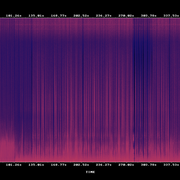
Untuk Bisa spektrogran lebih baik menggunakan app spek saja. digunakan wav karena sebagian cli codec tidak dapat menconvert flac secara langsung. jadi wav1-wav2=delta.wav. delta.wav adalah perbedaan suaranya. contoh dengan spektogram ffmpeg. file1 original,
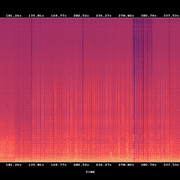
file 2 ogg 400,
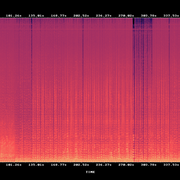
file 3 delta wav.
Adapun ini battle untuk 320 kbps. dimana ABX testing sebenarnya sudah cukup bagus untuk bitrate segini. BEST VALUE : FDKAAC 0.6.3m8 VBR 8
Code:
320 KBPS BATTLE — FINAL ANALYSIS (RINGKAS)


--------------------------------------------------------------------------------------------------------------------------------

Rank | Encoder & Version                  | Mode        | RMS Diff  | Size        | Bitrate      | Quality

--------------------------------------------------------------------------------------------------------------------------------

0  | FLAC                              | Lossless    | 0.000000  | 48,030 KB    | 909 kbps    | PERFECT

--------------------------------------------------------------------------------------------------------------------------------

1  | FDKAAC 0.6.3m8                    | VBR 8      | 36.734309  | 17,429 KB    | 273 kbps    | EXCELLENT

2  | FDKAAC 0.6.3m8                    | CBR 320    | 43.958461  | 17,363 KB    | 321 kbps    | VERY GOOD

3  | QAAC 2.8 (Apple)                  | ABR 320    | 45.092787  | 17,189 KB    | 326 kbps    | VERY GOOD

4  | Nero AAC 1.5.4                    | Q8          | 46.308000  | 17,523 KB    | 324 kbps    | VERY GOOD

5  | QAAC 2.8 (Apple)                  | CBR 320    | 47.580781  | 16,958 KB    | 321 kbps    | VERY GOOD

6  | FHGAACENC tmkk                    | CBR 320    | 50.264453  | 17,362 KB    | 321 kbps    | VERY GOOD

7  | Nero AAC 1.5.4                    | ABR 320 2p  | 51.860295  | 17,179 KB    | 318 kbps    | VERY GOOD

8  | lvqcl WMA10Pro                    | Quality 98  | 52.716126  | 15,888 KB    | 249 kbps    | VERY GOOD

9  | Vorbis oggenc2 v2.88              | Q8          | 53.183075  | 17,932 KB    | 332 kbps    | VERY GOOD

10  | Nero AAC 1.5.4                    | CBR 320    | 54.228251  | 17,365 KB    | 321 kbps    | VERY GOOD

11  | Opus 1.3.1                        | VBR 320    | 60.518962  | 18,547 KB    | 343 kbps    | GOOD

12  | Opus 1.3.1                        | CVBR 320    | 62.217542  | 17,397 KB    | 322 kbps    | GOOD

13  | lvqcl WMA9                        | CBR 320 (2p)| 68.725147  | 17,384 KB    | 320 kbps    | GOOD

14  | lvqcl WMA9                        | Quality 98  | 69.431700  | 18,197 KB    | 285 kbps    | GOOD

15  | lvqcl WMA9                        | CBR 320 (1p)| 69.637000  | 17,369 KB    | 320 kbps    | GOOD

16  | LAME 3.100                        | CBR 320    | 76.773076  | 17,284 KB    | 320 kbps    | GOOD

17  | LAME 3.100                        | ABR 320    | 77.022712  | 16,390 KB    | 320 kbps    | GOOD

18  | LAME 3.100                        | VBR 0      | 87.933122  | 14,891 KB    | ~245 kbps    | FAIR

--------------------------------------------------------------------------------------------------------------------------------
Diubah oleh realbabilu 13-12-2025 01:31


LieIrfan dan FalianAridua memberi reputasi
2
944
11

Komentar yang asik ya
Mari bergabung, dapatkan informasi dan teman baru!

Audio & Video
9.9KThread•7.9KAnggota
Urutkan
Terlama
Komentar yang asik ya