


- Beranda
- Featured Phone
Firefox OS Lounge
...


TS
atumiwa33
Firefox OS Lounge
Welcome to Firefox OS Lounge....

Bermula dari banyaknya pertanyaan - pertanyaan yang tidak saya temukan di google, akhirnya saya membuat thread untuk ponsel dengan OS Firefox . Manatau bisa saling sharing dan berbagi pengetahuan .
Apakah itu Firefox OS?
Jb. Firefox OS (dulu bernama Boot to Gecko/ B2G) adalah OS ponsel berbasis Linux open-source dan HTML5 untuk ponsel dan tablet, yang di buat oleh Mozilla, sebuah perusahaan yang terkenal akan internet browsernya.
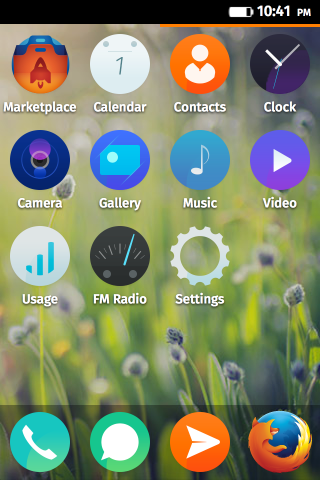 Versi 1.3 / 1.4
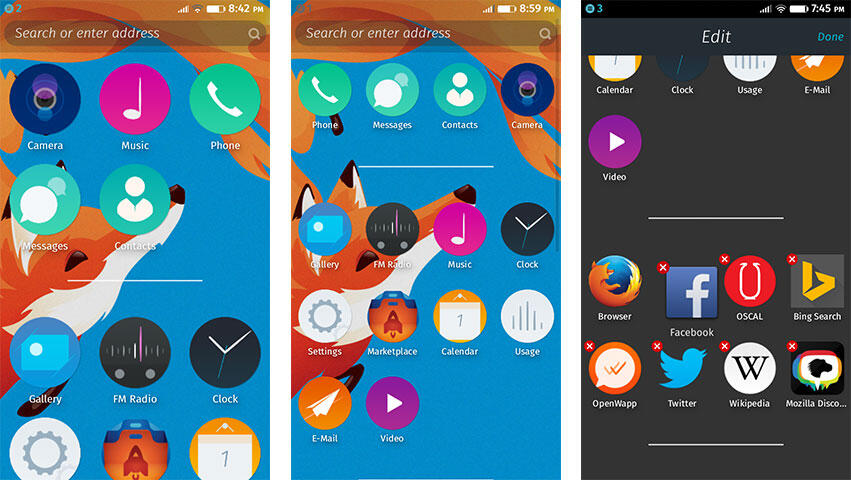
Versi 2.x , homescreen sudah pake sistem scroll vertikal (atas-bawah)
Aplikasi dan Game
App terkenal yang direkomendasi
Games:
Tips n Trick
Cara Hard Reset:
Warning: Resetting your device will delete all your data, like apps, contacts, email, messages, calendars and settings. It will restore your device to the state it was in when you first purchased it. Use this step as a last resort.
If you can't reset your device normally, you can do what's called a "hard reset."
1. Make sure your device is off. If you can't turn it off normally, remove and then replace the battery.
2. Hold down the power, volume up and home button all at the same time until you see the reset screen.
3. Press the volume up to continue resetting your device.
Cara ScreenShot: Tekan tombol Power + Home bersamaan
Untuk V2.x = Tekan tombol Power + Volume Down
Cara Root dan Flashing Rom: (do at your own risk)
Untuk Zte Open C: http://www.kaskus.co.id/show_post/53...ox-os-13-to-14
Newest Update
B2G - Versi 2.2
Review
sementara masih situs luar: ZTE Open C with Firefox OS 1.3
- http://www.gsmarena.com/firefox_os-review-1108.php
Model-model ponsel Firefox yang sudah ada :
http://en.wikipedia.org/wiki/List_of...fox_OS_devices
FAQ:
1. Apakah Firefox phone sudah hadir di Indonesia?
jb. belum gan..., kudu impor
2. Berapakah versi Firefox OS minimal yang di rekomendasikan?
jb. Minimal Versi 1.4 (sudah cukup stable), paling bagus 2.2 karena sudah ga ada kekurangan.
3. Smooth ? lag?
jb. kalo versi 1.4 uda smooth banget gan, no problem lah biar spec rendah
Peraturan
1. Dilarang Junk
2. Dilarang jualan
masih update....
Bermula dari banyaknya pertanyaan - pertanyaan yang tidak saya temukan di google, akhirnya saya membuat thread untuk ponsel dengan OS Firefox . Manatau bisa saling sharing dan berbagi pengetahuan .
Apakah itu Firefox OS?
Jb. Firefox OS (dulu bernama Boot to Gecko/ B2G) adalah OS ponsel berbasis Linux open-source dan HTML5 untuk ponsel dan tablet, yang di buat oleh Mozilla, sebuah perusahaan yang terkenal akan internet browsernya.
Versi 1.3 / 1.4Versi 2.x , homescreen sudah pake sistem scroll vertikal (atas-bawah)
Aplikasi dan Game
App terkenal yang direkomendasi
- Line Messenger
- Facebook
- Twitter
- ConnectA2 (Whatsapp Client di Firefox)
- SoundCloud
- Youtube
- Pinterest
- Box
- Nokia Here Map
- File Manager
- Telegram (messenger yang support platform lebih banyak dari Whatsapp)
Games:
- CutTheRope
- Candy Crush
- Slice Fruits
Tips n Trick
Cara Hard Reset:
Warning: Resetting your device will delete all your data, like apps, contacts, email, messages, calendars and settings. It will restore your device to the state it was in when you first purchased it. Use this step as a last resort.
If you can't reset your device normally, you can do what's called a "hard reset."
1. Make sure your device is off. If you can't turn it off normally, remove and then replace the battery.
2. Hold down the power, volume up and home button all at the same time until you see the reset screen.
3. Press the volume up to continue resetting your device.
Cara ScreenShot: Tekan tombol Power + Home bersamaan
Untuk V2.x = Tekan tombol Power + Volume Down
Cara Root dan Flashing Rom: (do at your own risk)
Untuk Zte Open C: http://www.kaskus.co.id/show_post/53...ox-os-13-to-14
Newest Update
B2G - Versi 2.2
Review
sementara masih situs luar: ZTE Open C with Firefox OS 1.3
- http://www.gsmarena.com/firefox_os-review-1108.php
Model-model ponsel Firefox yang sudah ada :
- Alcatel OneTouch Fire series
- ZTE Open series
- Geeksphone series (salah satu model bisa dual boot dgn Android)
- LG Fireweb
- Huawei Y300II
http://en.wikipedia.org/wiki/List_of...fox_OS_devices
FAQ:
1. Apakah Firefox phone sudah hadir di Indonesia?
jb. belum gan..., kudu impor
2. Berapakah versi Firefox OS minimal yang di rekomendasikan?
jb. Minimal Versi 1.4 (sudah cukup stable), paling bagus 2.2 karena sudah ga ada kekurangan.
3. Smooth ? lag?
jb. kalo versi 1.4 uda smooth banget gan, no problem lah biar spec rendah
Peraturan
1. Dilarang Junk
2. Dilarang jualan
masih update....
Diubah oleh a_tumiwa 22-09-2014 22:51
0
9.1K
49

Komentar yang asik ya
Mari bergabung, dapatkan informasi dan teman baru!

Featured Phone 
5KThread•1.2KAnggota
Tampilkan semua post
rockeyguns
#20
Upgrade Firefox OS 1.3 to 1.4
Quote:

Pertama, download dulu bahan"nya :
CWM : http://www*mediafire*com/download/s1a8jbb5zn2yfcp/cw_recovery_50.img
ROM : http://www*mediafire*com/download/5t303349en3wwv3/signed_1.4_fixed.zip
source : Forum XDA-Developers
Kedua, masukkan File ROM ke sdcard
dan pindahkan file cwm ke C:/ (agar kita mudah mengaksesnya)
Ketiga, kita akitin dulu USB Debuggingnya :
Masuk Settings - Device Information - More Information - Developer - Remote Debugging
Keempat, bagi pengguna Windows, download dan install ADB+Flashboot drivernya di
http://forum*xda-developers*com/showthread.php?t=2588979
Kelima colokkan USB ke PC (dalam keadaan HH masih menyala)
Keenam, cek apakah HH kita udah terdeteksi di PC dengan cara :
Buka CMD - ketik "adb devices" (tanpa tanda petik)
nanti akan terlihat device-idnya
Ketujuh, install CWMnya dengan cara :
Buka CMD
ketik ini :
adb reboot bootloader (nanti HH akan restart dan stuck di logo Firefox OS, tapi sebenarnya ini bukan stuck, melainkan masuk ke flashboot)
fastboot devices
fastboot boot (lokasi CWM)
misalkan kita menaruh CWM di C:/ jadi kita ketik
fastboot boot C:/cw_recovery_50.img
Kedelapan, setelah itu masuk CWMnya (Power+Volume Up)
Kesembilan, install ROM seperti biasa

DONE

NOTE : FOR ZTE OPEN C ONLY
Kalo berkenan mohon ane dilempar


Diubah oleh rockeyguns 25-07-2014 05:44
0