


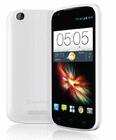

TS
andromaxv
[Official Lounge] Smartfren Andromax-V (ZTE N986) - Part 1
OFFICIAL LOUNGE SMARTFREN ANDROMAX V
Yang gak merasa ganteng ataupun cantik, JANGAN Download dan baca kitab suci di post 6
For information in English, see post 18
Untuk pengguna new Max V, lihat post 8
![[Official Lounge] Smartfren Andromax-V (ZTE N986) - Part 1](https://s.kaskus.id/images/2013/09/17/3075658_20130917092801.png)
![[Official Lounge] Smartfren Andromax-V (ZTE N986) - Part 1](https://s.kaskus.id/images/2013/11/20/2305814_20131120074715.jpg)
Warning dari Momod JDD!!!
Quote:
Quote:
Official Commercial

Quote:
Original Posted By awaaas►
btw, grup andromax-v facebook pindah rumah gan
![[Official Lounge] Smartfren Andromax-V (ZTE N986) - Part 1](https://dl.kaskus.id/i.imgur.com/gzcMbSp.png)
Klik gambar untuk ke rumah baru grup facebook andromax-v
btw, grup andromax-v facebook pindah rumah gan
Klik gambar untuk ke rumah baru grup facebook andromax-v
Code:
https://www.facebook.com/groups/601912306541094/
Spoiler for Rumah Facebook lama:
WA dan Line dihapus atas request dari agan rajax, berhubung adminnya sudah tidak Request Time Out(alias tidak reply lagi). Ada masalah baca dulu kitab suci. Kalau ga mempan baru post di trit saja atau di facebook. TS masih di sini kok
 (sibuk susun kitab suci AMV007). Sudah 3 bulan ga kelar2, soalnya ada restrukturisasi subbab dan ada penambahan informasi yang saling berkaitan. Sampai saat ini sudah ada sekitar 150 pertanyaan baru, dan diperkirakan akan mencapai 200 lebih. Sehingga AMV007 akan mencapai hampir 1100 pertanyaan dalam 400+ halaman. Ditunggu tanggal mainnya ya.
Clash of Max V Clan
Bagi yang main Clash of Clan, silahkan gabung di clan "Andromax V"
Requirement nya tropi 1200
Requirement nya tropi 1200
Teaser Kitkat
![[Official Lounge] Smartfren Andromax-V (ZTE N986) - Part 1](https://s.kaskus.id/images/2013/11/23/521121_20131123022506.png)
Real kitkat by mediatek, end of April 2014.
Tapi masih tergantung apakah ZTE atau SF mau repot2 ngerilisnya.
Spoiler for Kitkat:
Real kitkat by mediatek, end of April 2014.
Tapi masih tergantung apakah ZTE atau SF mau repot2 ngerilisnya.
Bagi agan2 yang kena error SPFT 3149 ataupun 5069
Quote:
Error 3149= partisi /data corrupt (muncul encryption unsuccessful)
Error 5069 = error 3149 yang diformat wholeflash di SPFT, HH matot
Sampai hari ini belum ada solusi lain selain diklaim garansi. Karena berdasarkan info yang kita ketahui, kedua error tersebut menunjukkan adanya kerusakan di hardware emmc. Bagi yang belum root/modif bisa langsung bawa galeri. Sedangkan bagi yang uda root/modif, agan juga tidak bisa unroot maupun unmodif. Jadi nampaknya satu2nya cara supaya tidak terdeteksi sudah pernah root/modif, harus diformat wholeflash di SPFT, dengan resiko MEID/IMEI hilang kalau belum pernah backup MDT untuk menyelamatkan nvram.bin. (salah agan sendiri). Baca Kitab Suci Max V, subbab klaim garansi.
Sejauh ini yang berhasil klaim garansi cuma satu orang, lamanya 1 bulan 11 hari (garansi biasanya 3-4 minggu). Itupun belum ada konfirmasi dari agan tersebut apakah HH nya diganti atau cuma direplace emmc nya.
Error 5069 = error 3149 yang diformat wholeflash di SPFT, HH matot
Sampai hari ini belum ada solusi lain selain diklaim garansi. Karena berdasarkan info yang kita ketahui, kedua error tersebut menunjukkan adanya kerusakan di hardware emmc. Bagi yang belum root/modif bisa langsung bawa galeri. Sedangkan bagi yang uda root/modif, agan juga tidak bisa unroot maupun unmodif. Jadi nampaknya satu2nya cara supaya tidak terdeteksi sudah pernah root/modif, harus diformat wholeflash di SPFT, dengan resiko MEID/IMEI hilang kalau belum pernah backup MDT untuk menyelamatkan nvram.bin. (salah agan sendiri). Baca Kitab Suci Max V, subbab klaim garansi.
Sejauh ini yang berhasil klaim garansi cuma satu orang, lamanya 1 bulan 11 hari (garansi biasanya 3-4 minggu). Itupun belum ada konfirmasi dari agan tersebut apakah HH nya diganti atau cuma direplace emmc nya.
Diubah oleh andromaxv 16-06-2014 01:04
0
1.5M
10K
Thread Digembok
Mari bergabung, dapatkan informasi dan teman baru!

Android
29.6KThread•17.9KAnggota
Tampilkan semua post

User telah dihapus
#2361
Upgrade/Downgrade ZTE N986 Tutorial (English)
ZTE N986 (Smartfren Andromax-V)
Upgrade/Downgrade Tutorial
Upgrade/Downgrade Tutorial
I'm not responsible to anything that happens to your phone by using this tutorial.
Do a backup with MTK Droid Tools (MDT) first
Do a backup with MTK Droid Tools (MDT) first
Untuk tutorial bahasa Indonesia, silahklan lihat post ini
Quote:
Quote:
Quote:
Quote:
Quote:
Original Posted By Steps
1. Open your MDT backup folder
2. Copy secro.img
3. Go to your to-be-flashed ROM's folder, and paste there
4. Open SPFT
![kaskus-image]()
5. Press Load scatter button, and open file MT6589_Android_scatter_emmc.txt located in your to-be-flashed ROM's folder
![kaskus-image]()
6. Match the checkboxes with this picture
![kaskus-image]()
7. Press Formatbutton, a new window will appear, choose Format whole flash, then click OK
![kaskus-image]()
8. Turn off your phone, take out the battery, and connect it to your PC, and wait untill formatting process is completed (there will be a new window with green circle in it called Format OK)
![kaskus-image]()
9. Disconnect your phone, and press Downloadbutton, press Yes if there any warning or confirmation appears
![kaskus-image]()
10. Connect your phone, and wait untill downloading/flashing process is completed (there will be a new window with green circle in it called Download OK)
![kaskus-image]()
11. Disconnect your phoneCabut ponsel, and put back your battery
12. Press and hold Power + Volume upbuttons, until you see lying Android image
13. Press [b}volume down[/b] button to make the menus appear
14. Choose Wipe data/factory reset (navigation: volume buttons, choosing menu: power button)
15. Choose reboot system
16. Wait until booting process is completed
17. Fill out the data as usual (you can skip this)
18. Go to System Settings
19. Choose About Phone
20. Tap Build Number 7 times
21. Go back, there will be a new menu, called Developer options, tap it
22. Check USB Debugging, type the password if you asked to
23. Connect your phone to PC
24. Open MDT
25. Press ROOT button. Press Yes on confirmation window that appears
![kaskus-image]()
26. Look into your phone's display, there maybe some root access confirmation that appears allow it by choosing Grantor Allow
27. Press IMEI button on MDT, your IMEI will be null
![kaskus-image]()
28. Press Restorebutton
29. In the first dialog, open nvram.bin file, which is located inside your MDT backup folder
![kaskus-image]()
30. In the second dialog, open userdata_nvram_only.ext4.tarfile, which is located inside your MDT backup folder
![kaskus-image]()
31. IMEI window will be closed automatically, you can see restore process in MDT's log area
![kaskus-image]()
32. Press Rebootbutton in MDT's window, choose Reboot in the next window
![kaskus-image]()
33. After reboots, your IMEI+MEID (and Wifi+Bluetooth MAC Address) will be back as it should
![kaskus-image]()
1. Open your MDT backup folder
2. Copy secro.img
3. Go to your to-be-flashed ROM's folder, and paste there
4. Open SPFT
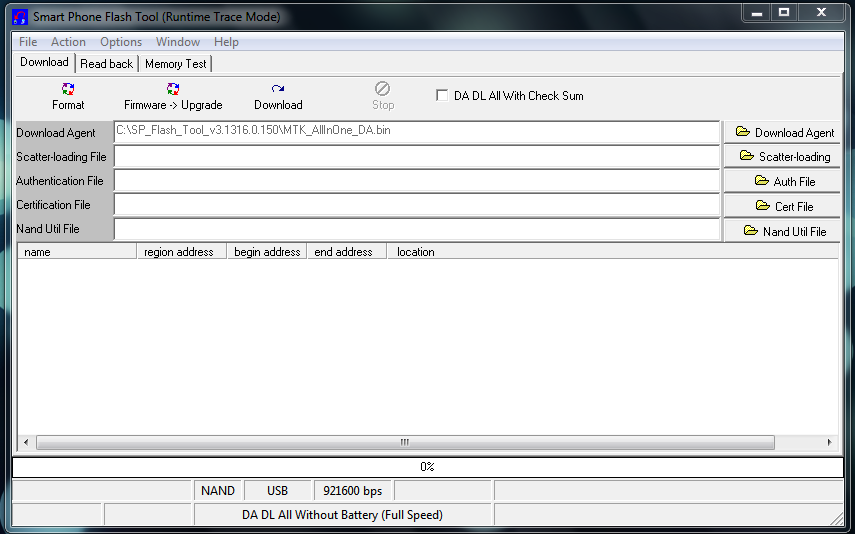
5. Press Load scatter button, and open file MT6589_Android_scatter_emmc.txt located in your to-be-flashed ROM's folder
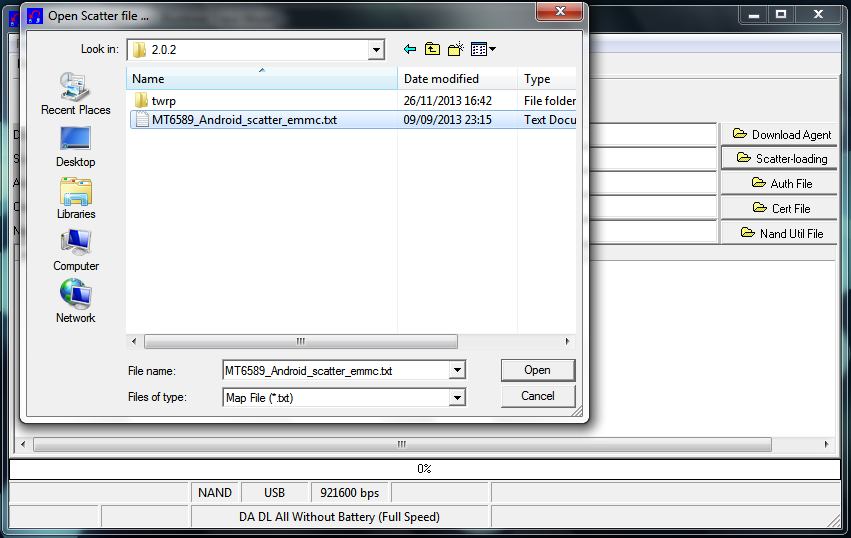
6. Match the checkboxes with this picture
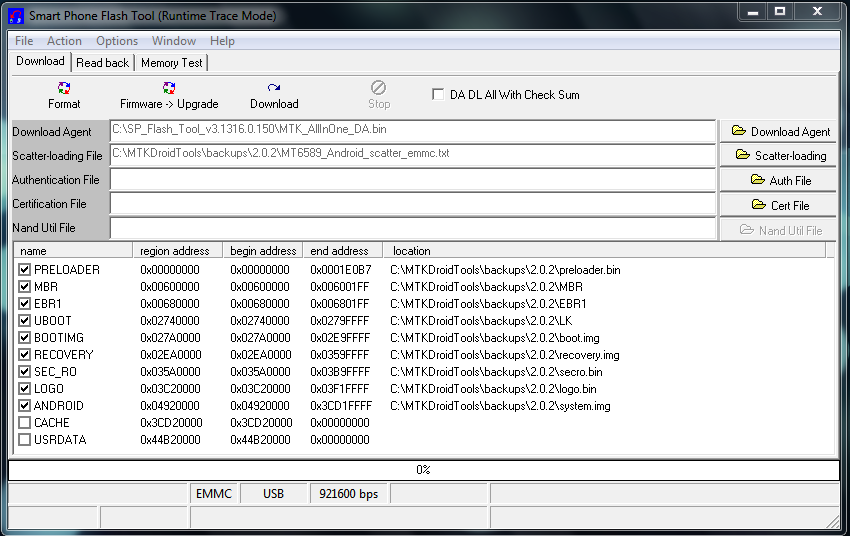
7. Press Formatbutton, a new window will appear, choose Format whole flash, then click OK
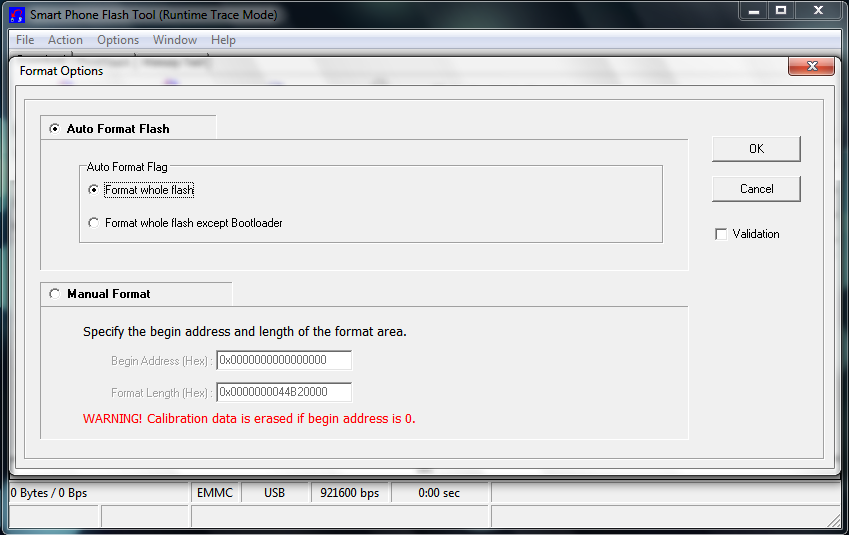
8. Turn off your phone, take out the battery, and connect it to your PC, and wait untill formatting process is completed (there will be a new window with green circle in it called Format OK)

9. Disconnect your phone, and press Downloadbutton, press Yes if there any warning or confirmation appears

10. Connect your phone, and wait untill downloading/flashing process is completed (there will be a new window with green circle in it called Download OK)
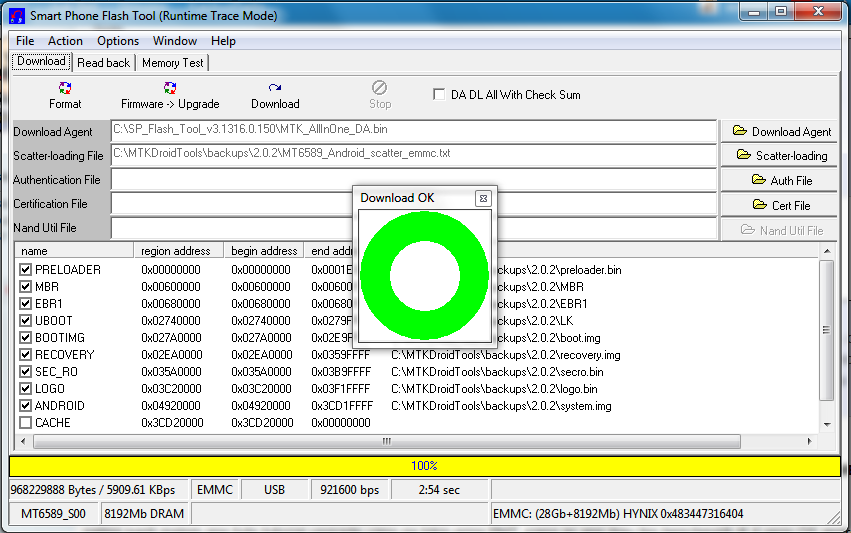
11. Disconnect your phoneCabut ponsel, and put back your battery
12. Press and hold Power + Volume upbuttons, until you see lying Android image
13. Press [b}volume down[/b] button to make the menus appear
14. Choose Wipe data/factory reset (navigation: volume buttons, choosing menu: power button)
15. Choose reboot system
16. Wait until booting process is completed
17. Fill out the data as usual (you can skip this)
18. Go to System Settings
19. Choose About Phone
20. Tap Build Number 7 times
21. Go back, there will be a new menu, called Developer options, tap it
22. Check USB Debugging, type the password if you asked to
23. Connect your phone to PC
24. Open MDT
25. Press ROOT button. Press Yes on confirmation window that appears
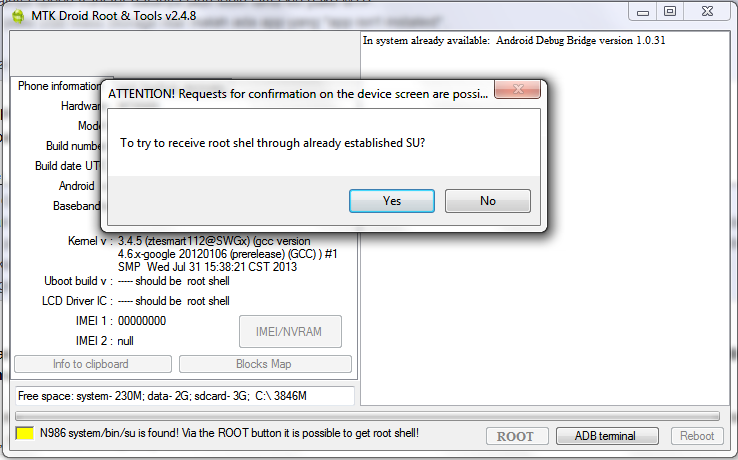
26. Look into your phone's display, there maybe some root access confirmation that appears allow it by choosing Grantor Allow
27. Press IMEI button on MDT, your IMEI will be null

28. Press Restorebutton
29. In the first dialog, open nvram.bin file, which is located inside your MDT backup folder
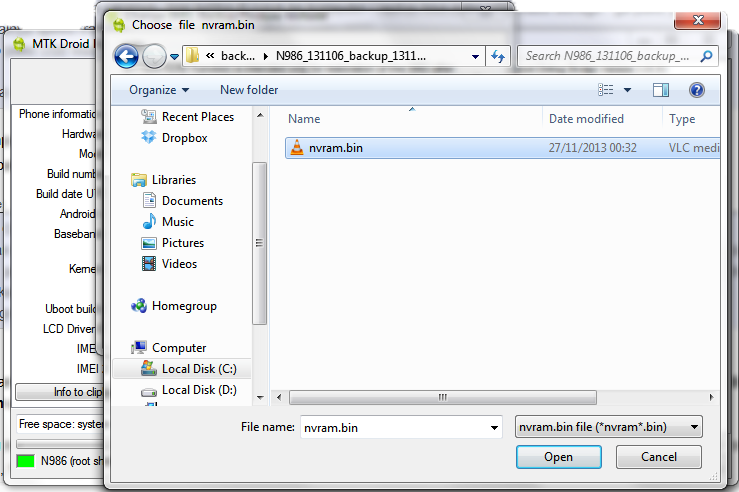
30. In the second dialog, open userdata_nvram_only.ext4.tarfile, which is located inside your MDT backup folder
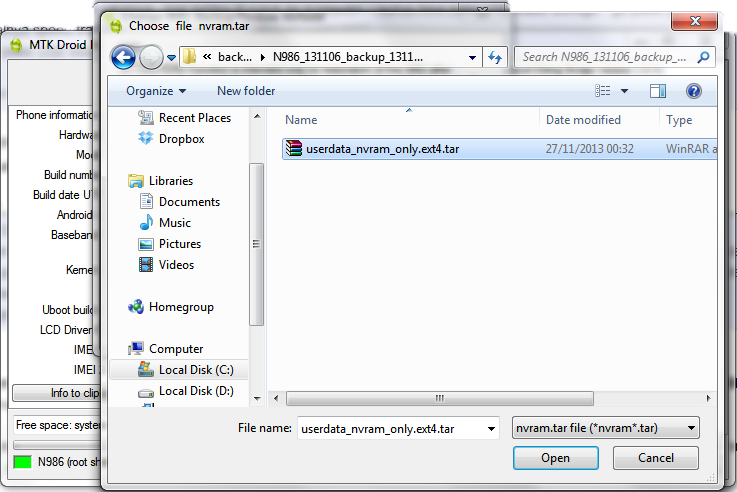
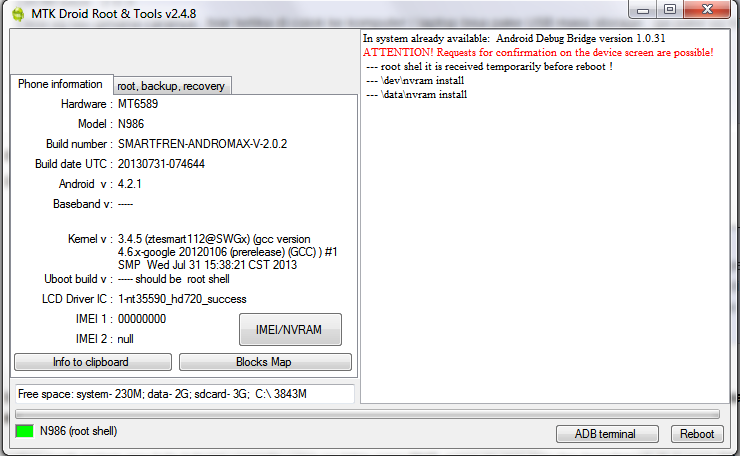
31. IMEI window will be closed automatically, you can see restore process in MDT's log area
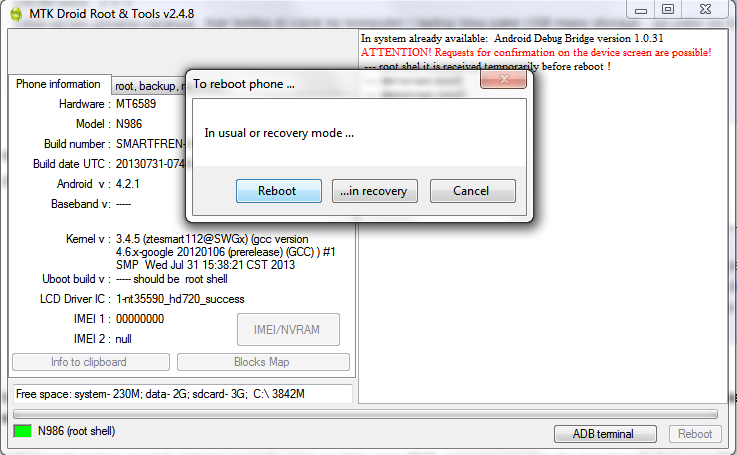
32. Press Rebootbutton in MDT's window, choose Reboot in the next window
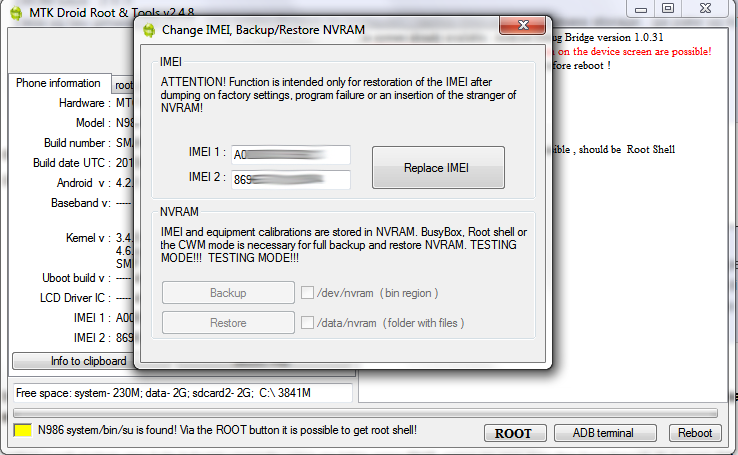
33. After reboots, your IMEI+MEID (and Wifi+Bluetooth MAC Address) will be back as it should
Quote:
Original Posted By Notes
Upgrade and downgrade process is the same, you only need to change the files
What makes this tutorial different from previous tutorials?
1. More clear steps
2. It doesn't break original PMT (no more Kernel Block Map to PMT mismatch!shows up in MDT)
3. More pictures
You can make MDT's backup in any rom, as long as your IMEI+MEID is intact.
Only nodl_secro.img, nvram.bin, and userdata_nvram_only.ext4.tar is needed to restore your IMEI
PMT error sample:
What's the effect from PMT error?
From what I experienced, mobile connection is relatively unstable if you have PMT error
IMEI still Invalid/00000, although you've already restored it?
Do a factory reset once more, and don't restore from previous rom data backup.
For New Andromax-V / ZTE N986Dusers:
You don't need to pull out the battery, just enter download mode (while phone is off: press and hold power + volume down button (notification led is green), and then plug your phone to start flashing/downloading.
Upgrade and downgrade process is the same, you only need to change the files
What makes this tutorial different from previous tutorials?
1. More clear steps
2. It doesn't break original PMT (no more Kernel Block Map to PMT mismatch!shows up in MDT)
3. More pictures
You can make MDT's backup in any rom, as long as your IMEI+MEID is intact.
Only nodl_secro.img, nvram.bin, and userdata_nvram_only.ext4.tar is needed to restore your IMEI
PMT error sample:
Spoiler for screenshot:
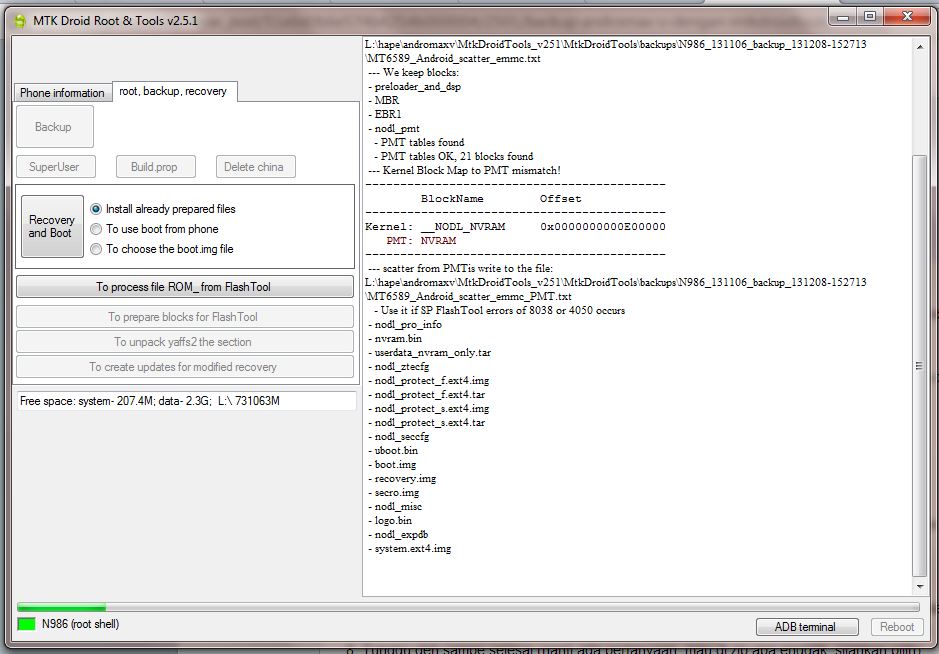
What's the effect from PMT error?
From what I experienced, mobile connection is relatively unstable if you have PMT error
IMEI still Invalid/00000, although you've already restored it?
Do a factory reset once more, and don't restore from previous rom data backup.
For New Andromax-V / ZTE N986Dusers:
You don't need to pull out the battery, just enter download mode (while phone is off: press and hold power + volume down button (notification led is green), and then plug your phone to start flashing/downloading.
Don't forget to:

Diubah oleh User telah dihapus 29-04-2014 13:43
0