
TS
official.p780
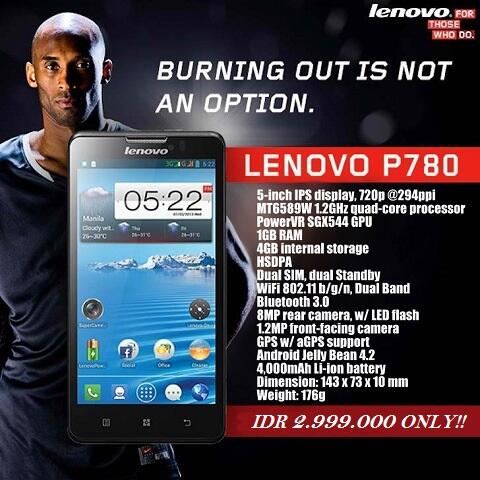
(NEW OFFICIAL LOUNGE) LENOVO P780 - BURNING OUT IS NOT AN OPTION
*Last Update 11 Februari 2014

VIDEOS
Spoiler for videos:

Spoiler for Unboxing:
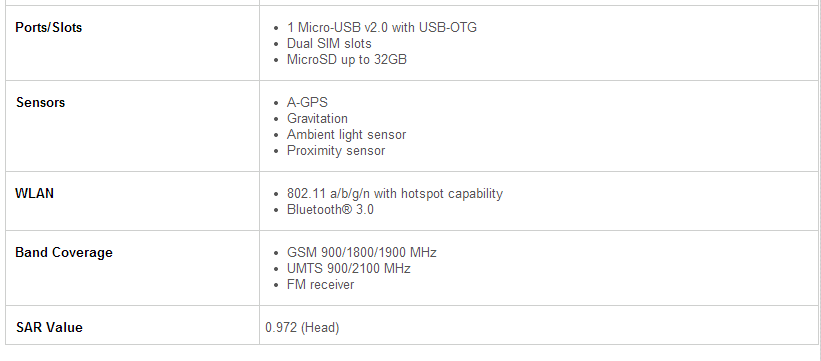
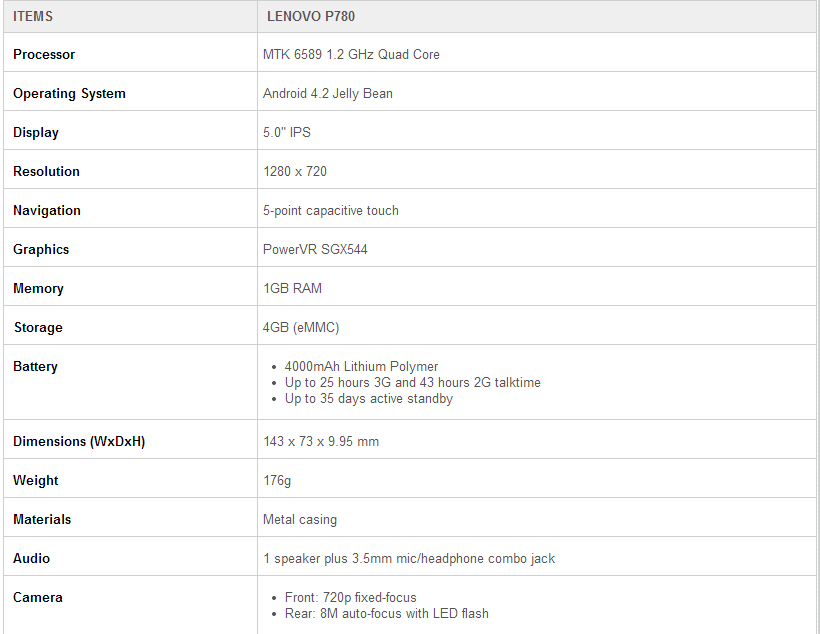
SPECIFICATION
Spoiler for Spec:
GENERAL RULES
Quote:
- Thread ini hanya untuk diskusi seputar LENOVO P780, bukan device lain.
- Thread ini adalah sarana diskusi, bukan tempat untuk berdebat, jualan, barcen, nitip lapak, sundul, junk post, dsb.
- Jadilah Kaskuser yang bijak, gunakan multi quote, dilarang dopost, tripost, , dsb.
- Usahakan posting jangan one liner, supaya tidak dikira junk post.
- Apabila mau post gambar atau video, WAJIB SPOILER terutama gambar2 dan video berukuran besar.
- Page 1 dan GOOGLE adalah teman anda, cari dahulu jawaban disana, jika tidak ketemu baru bertanya disini.
- Tidak perlu bertanya via VM atau PM kepada member disini. Diskusikan bersama di Thread ini, supaya sekalian berbagi pengalaman dan ilmu.
- Dilarangan menggunakan emot kasar seperti

, emot ijo2 seperti
, dan menggunakan kata2 kasar seperti ****** - Dilarang post berbau SARA, POLITIK, ETNIS, AGAMA, PORNOGRAFI, DISTURBING PICTURE, LONGCAT, dsb.
- Bagi yang melanggar aturan, siap2 terima bata dari member sini, sampai delete post, dan ban permanen.
- Page 1 dibuat dengan sebaik dan se-informatif mungkin, jadi sebelum bertanya, liat dulu page 1 untuk mencari jawaban. Kalo jawaban udah di Page 1, jgn mewek kalo pertanyaan ga dijawab.
- DILARANG KERAS BERJUALAN DI LOUNGE LENOVO P780 ( pelanggar = Banned )
- Segala aturan yang belum ada, akan ditambahkan sesuai kebutuhan di kemudian hari. Jika belum cukup diatur, maka silahkan lihat General Rules untuk post di forum dari Admin/Momod.
Quote:
Group WA Untuk P780 User
- Berdasarkan permintaan para kaskuser untuk dibuatnya Group P780 ini, maka TS akan membuat Group Whatsapp, dimana jumlah member akan dibatasi.
- Bagi agan - agan yang ingin di invite di group ini harap bisa PMidentitas : Nama, TTL, No HP untuk Whatsapp yang bisa dihubungi
Dengan Dibentuknya Group ini Diharapkan Bisa Mempermudah Para Agan-Agan Sekalian Untuk Sharing atau Tanya Jawab Di Group Ini
*Warning : Harap yang masuk group ini berkomunikasilah dengan sopan, jangan heran kalau di kick jikalau melanggar sopan santun.
TERIMA KASIH
Quote:
Group Facebook P780
Group FB Ini dibuat bertujuan untuk mempermudah Para Kaskuser Disini Supaya Saling Lebih Mengenal dan Menjalin Komunikasi yang baik bukan hanya di Kaskus,tapi melainkan di Facebook juga. Diharapkan dengan keberadaan Group FB ini, sharing tentang p780 tetap dapat dilakukan di group tersebut.
Group bisa dikunjungi diFB Lenovo P780 Indonesia
Terima Kasih
Spoiler for Pendaftaraan P780 User:
Langsung Saja Untuk Pendaftaran bisa Klik DAFTAR (1 User Diharapkan mengisi data cukup 1x saja)
Untuk Melihat Data User Lain Bisa Klik Lihat Data User
Quote:
Diubah oleh official.p780 11-02-2014 16:26

bebeninfinix313 memberi reputasi
1
1.5M
Kutip
10K
Balasan
Thread Digembok
Mari bergabung, dapatkan informasi dan teman baru!
Android
29.6KThread•17.5KAnggota
Tampilkan semua post
p3n4kluk
#3455
Quote:
Original Posted By BesFen►
Saya banyak membaca agan2 sekalian pada banyak mengeluhkan mengenai sisa RAM yg tinggal sedikit, dan pada mencari solusi untuk meminimalkan app yg jalan di background atau menggunakan task killer/ram booster.
Sebenarnya hal ini tidak perlu dilakukan karena semenjak lahir, Android mempunyai Build In Auto Task Killer, dan biasa disebut LMK/Low Memory Killer.
Auto Task Killer yg ada di android ini lebih baik dibandingkan dengan task killer/ram booster yg ada di play store, kenapa saya bilang lebih baik, karena task killer/ram booster yg lain tidak bisa memilah2 mana app/service yg masih diperlukan & mendukung kerja Android dan mana yg tidak, sehingga sering sekali service/app yg merupakan bagian penting dr android ikut tertutup, meskipun dia akan start sendiri lagi, biasanya ditandai dengan lag sedikit setelah task killer/ram booster dijalankan.
Di dalam LMK ini ada 6 pembagian untuk pengaturan task killer, yaitu:
FOREGROUND_APP
VISIBLE_APP
SECONDARY_SERVER
HIDDEN_APP
CONTENT_PROVIDER
EMPTY_APP
FOREGROUND_APP: This is the application currently on the screen, and running
VISIBLE_APP: This is an application that is open, and running in the background because it's still doing something
SECONDARY_SERVER: This is a process (a service that an application needs) that is alive and ready in case it's needed to do something
HIDDEN_APP: This again is a process, that sits idle (but still alive) in case it's needed by an app that's alive and running
For the most part, we never want to adjust when these apps and processes are killed off. They are the things that the programs we use need to properly function. For the more bold and advanced users, changing settings for HIDDEN_APP settings is possible, albeit with a LOT of trial and error. There's two more settings, and these are the ones most interesting to us today:
CONTENT_PROVIDER: This is apps that provide data (content) to the system. HTC Facebook Sync? That's a CONTENT_PROVIDER. So are things like the Android Market, or Fring. If they are alive, they can refresh and provide the content they are supposed to at the set interval. If you kill them, they can't of course.
EMPTY_APP: I call these "ghosts." They are apps that you have opened, but are done with them. Android uses a unique style of handling memory management. When an activity is ended, instead of killing it off Android keeps the application in memory so that opening them again is a faster process. Theses "ghost" apps use no battery or CPU time, they just fill RAM that would be otherwise empty. When this memory is needed by a different application or process, the RAM is flushed and made available for the new app. To satisfy the geekier people (like myself) Android does this by keeping a list of recently used apps, with the oldest apps in the list given the lowest priority -- they are killed first if RAM is needed elsewhere. This is a perfect way to handle 'ghost' processes, so there's no need to touch this part
Setiap HH mempunyai setting LMK yg berbeda2, nah untuk mengetahui maka kita bisa melakukannya melalui Terminal Emulator(Bisa di download di Play Store)
Kemudian masukkan kode:
Maka akan keluar angka2 yg merupakan setingan dr LMK.
Angka2 ini menunjukkan minimum RAM bagi task killer utk menutup aplikasi, jadi:
FOREGROUND_APP = 8192*4/1024=32MB
VISIBLE_APP = 10240*4/1024=40 MB
SECONDARY_SERVER = 12288*4/1024=48 MB
HIDDEN_APP = 14336*4/1024=56 MB
CONTENT_PROVIDER = 16384*4/1024=64 MB
EMPTY_APP = 20480*4/1024=80 MB
Agan2 sekalian bisa merubah angka2 itu sesuai dengan yg dibutuhkan.
BAGAIMANA CARA MENGGANTI ANGKA2 TERSEBUT
DO IT WITH YOUR OWN RISK
SELALU LAKUKAN BACKUP SEBELUM MELANGKAH LEBIH JAUH
Cara Manual, yaitu dengan menuliskan di Terminal emulator:
Itu adalah setingan saya untuk: 60MB, 80MB, 100MB, 120Mb, 150Mb, 200Mb
Cara diatas tidak bersifat permanen, jadi klo restart maka angka2 tersebut akan kembali ke default dan harus di set kembali, Ribet bukan?
Agar setingan tersebut diload setiap kali booting, maka perlu dibuatkan script yg akan selalu dipanggil setiap kali booting, ada 2 cara untuk melakukannya, yaitu
1. Dengan menambahkan init.d runpart di kernel
Beberapa developer biasanya akan mengikutkan init.d runpart di boot.img-nya, sehingga agan2 hanya perlu menaruh file scipt di /system/etc/init.d dg root explorer atau app sejenis, lalu restart.
Bagi agan2 yg menggunakan custom ROM, coba tanyakan pada developernya apakah kernel mereka sudah mendukung init.d atau belum, klo sudah bisa langsung di copy ke lokasi tersebut.
2. Dengan aplikasi pihak ketiga
Syarat utama harus rooted.
Apabila kernel agan tidak support init.d atau agan memakai stock rom maka ada aplikasi pihak ketiga yg bernama UNIVERSAL INIT D, bisa di download di play store. Jalankan aplikasinya, lalu aktifkan dengan menggeser tombol OFF menjadi ON, lalu copy file scriptnya di /system/etc/init.d dg root explorer atau app sejenis, lalu restart.
Cara Mengetahui script sudah di load
Melalui terminal emulator
Klo angka yg muncul sama seperti yg ada di script berarti script sudah sukses di load
Nama Script
Nama script harus dimulai dengan 2 angka, angka ini akan menunjukkan urutan pemanggilan script, hindari awalan angka 00 s/d 10, 99, 50, Krn biasanya angka awalan tersebut sudah dipakai oleh developer ROM, hal ini dilakukan utk menghindari terjadinya konflik urutan pemanggilan script.
Ini gan ane lampirkan Script saya, silahkan di modif sesuai selera, ngedit bisa pakai text editor di root explorer atau dr PC pakai superedit atau notepad++(Saya blm pernah coba pakai notepad)
[URL="http://www.4*shared.com/file/TKAFhmze/13lmk.html"]SCRIPT[/URL]
Spoiler for LMK atau LOW MEMORY KILLER:
Saya banyak membaca agan2 sekalian pada banyak mengeluhkan mengenai sisa RAM yg tinggal sedikit, dan pada mencari solusi untuk meminimalkan app yg jalan di background atau menggunakan task killer/ram booster.
Sebenarnya hal ini tidak perlu dilakukan karena semenjak lahir, Android mempunyai Build In Auto Task Killer, dan biasa disebut LMK/Low Memory Killer.
Auto Task Killer yg ada di android ini lebih baik dibandingkan dengan task killer/ram booster yg ada di play store, kenapa saya bilang lebih baik, karena task killer/ram booster yg lain tidak bisa memilah2 mana app/service yg masih diperlukan & mendukung kerja Android dan mana yg tidak, sehingga sering sekali service/app yg merupakan bagian penting dr android ikut tertutup, meskipun dia akan start sendiri lagi, biasanya ditandai dengan lag sedikit setelah task killer/ram booster dijalankan.
Di dalam LMK ini ada 6 pembagian untuk pengaturan task killer, yaitu:
FOREGROUND_APP
VISIBLE_APP
SECONDARY_SERVER
HIDDEN_APP
CONTENT_PROVIDER
EMPTY_APP
Spoiler for Penjelasan, silahkan diterjemahin ya gan:
FOREGROUND_APP: This is the application currently on the screen, and running
VISIBLE_APP: This is an application that is open, and running in the background because it's still doing something
SECONDARY_SERVER: This is a process (a service that an application needs) that is alive and ready in case it's needed to do something
HIDDEN_APP: This again is a process, that sits idle (but still alive) in case it's needed by an app that's alive and running
For the most part, we never want to adjust when these apps and processes are killed off. They are the things that the programs we use need to properly function. For the more bold and advanced users, changing settings for HIDDEN_APP settings is possible, albeit with a LOT of trial and error. There's two more settings, and these are the ones most interesting to us today:
CONTENT_PROVIDER: This is apps that provide data (content) to the system. HTC Facebook Sync? That's a CONTENT_PROVIDER. So are things like the Android Market, or Fring. If they are alive, they can refresh and provide the content they are supposed to at the set interval. If you kill them, they can't of course.
EMPTY_APP: I call these "ghosts." They are apps that you have opened, but are done with them. Android uses a unique style of handling memory management. When an activity is ended, instead of killing it off Android keeps the application in memory so that opening them again is a faster process. Theses "ghost" apps use no battery or CPU time, they just fill RAM that would be otherwise empty. When this memory is needed by a different application or process, the RAM is flushed and made available for the new app. To satisfy the geekier people (like myself) Android does this by keeping a list of recently used apps, with the oldest apps in the list given the lowest priority -- they are killed first if RAM is needed elsewhere. This is a perfect way to handle 'ghost' processes, so there's no need to touch this part
Setiap HH mempunyai setting LMK yg berbeda2, nah untuk mengetahui maka kita bisa melakukannya melalui Terminal Emulator(Bisa di download di Play Store)
Kemudian masukkan kode:
Code:
su
Enter
cat /sys/module/lowmemorykiller/parameters/minfree
enter
Maka akan keluar angka2 yg merupakan setingan dr LMK.
Code:
8192,10240,12288,14336,16384,20480
Angka2 ini menunjukkan minimum RAM bagi task killer utk menutup aplikasi, jadi:
FOREGROUND_APP = 8192*4/1024=32MB
VISIBLE_APP = 10240*4/1024=40 MB
SECONDARY_SERVER = 12288*4/1024=48 MB
HIDDEN_APP = 14336*4/1024=56 MB
CONTENT_PROVIDER = 16384*4/1024=64 MB
EMPTY_APP = 20480*4/1024=80 MB
Agan2 sekalian bisa merubah angka2 itu sesuai dengan yg dibutuhkan.
BAGAIMANA CARA MENGGANTI ANGKA2 TERSEBUT
DO IT WITH YOUR OWN RISK
SELALU LAKUKAN BACKUP SEBELUM MELANGKAH LEBIH JAUH
Cara Manual, yaitu dengan menuliskan di Terminal emulator:
Code:
su
enter
echo “15360,20480,25600,30720,35840,44800” > /sys/module/lowmemorykiller/parameters/minfree
enter
Itu adalah setingan saya untuk: 60MB, 80MB, 100MB, 120Mb, 150Mb, 200Mb
Cara diatas tidak bersifat permanen, jadi klo restart maka angka2 tersebut akan kembali ke default dan harus di set kembali, Ribet bukan?
Agar setingan tersebut diload setiap kali booting, maka perlu dibuatkan script yg akan selalu dipanggil setiap kali booting, ada 2 cara untuk melakukannya, yaitu
1. Dengan menambahkan init.d runpart di kernel
Beberapa developer biasanya akan mengikutkan init.d runpart di boot.img-nya, sehingga agan2 hanya perlu menaruh file scipt di /system/etc/init.d dg root explorer atau app sejenis, lalu restart.
Bagi agan2 yg menggunakan custom ROM, coba tanyakan pada developernya apakah kernel mereka sudah mendukung init.d atau belum, klo sudah bisa langsung di copy ke lokasi tersebut.
2. Dengan aplikasi pihak ketiga
Syarat utama harus rooted.
Apabila kernel agan tidak support init.d atau agan memakai stock rom maka ada aplikasi pihak ketiga yg bernama UNIVERSAL INIT D, bisa di download di play store. Jalankan aplikasinya, lalu aktifkan dengan menggeser tombol OFF menjadi ON, lalu copy file scriptnya di /system/etc/init.d dg root explorer atau app sejenis, lalu restart.
Cara Mengetahui script sudah di load
Melalui terminal emulator
Code:
su
Enter
cat /sys/module/lowmemorykiller/parameters/minfree
enter
Klo angka yg muncul sama seperti yg ada di script berarti script sudah sukses di load
Nama Script
Nama script harus dimulai dengan 2 angka, angka ini akan menunjukkan urutan pemanggilan script, hindari awalan angka 00 s/d 10, 99, 50, Krn biasanya angka awalan tersebut sudah dipakai oleh developer ROM, hal ini dilakukan utk menghindari terjadinya konflik urutan pemanggilan script.
Ini gan ane lampirkan Script saya, silahkan di modif sesuai selera, ngedit bisa pakai text editor di root explorer atau dr PC pakai superedit atau notepad++(Saya blm pernah coba pakai notepad)
[URL="http://www.4*shared.com/file/TKAFhmze/13lmk.html"]SCRIPT[/URL]
Mantap gan, cm mau nambahin kesimpulan aj soalnya rada ribet buat user biasa (bukan developer) kaya ane kalo hrs edit script modif sendiri utk membuktikan:
You Should NOT Be Using a Task Killer with Android
Spoiler for The Facts:
- Android is hard coded to automatically kill a task when more memory is needed.
- Android is hard coded to automatically kill a task when it's done doing what it needs to do.
- Android is hard coded to automatically kill a task when you haven't returned to it in a long time.
- Most services (while possibly running in the background) use very little memory when not actively doing something.
- A content provider is only doing something when there is a notification for it to give. Otherwise it uses very little memory.
- Killing a process when it isn't ready only causes it to have to reload itself and start from scratch when it's needed again.
- Because a task is likely running in the background for a reason, killing it will only cause it to re-spawn as soon as the activity that was using it looks for it again. And it will just have to start over again.
- Killing certain processes can have undesirable side effects. Not receiving text messages, alarms not going off, and force closes just to name a few.
- The only true way to prevent something from running at all on your phone would be to uninstall the .apk.
- Most applications will exit themselves if you get out of it by hitting "back" until it closes rather than hitting the "home" button. But even with hitting home, Android will eventually kill it once it's been in the background for a while.
Versi lengkap
XDA FAQ: Why You Shouldn’t Be Using a Task Killer with Android (geekfor.me)
Android Task Killers Explained: What They Do and Why You Shouldn't Use Them
dan masih banyak lg, tinggal google
Satu lagi yg populer:
Battery Calibration is a Myth
Google Engineer Debunks Myth: Wiping Battery Stats Does Not Improve Battery Life
Wiping Battery stats and Battery Calibration Myth gets Debunked
Other myths(Quoted from:XDA Known Android Myths)
Spoiler for XDA Known Android Myths:
Task Killers: As much as this is obvious, people still uses it. So much, that it is annoying. Android handles apps and tasks well. However, there is an exception, and that is when the app constantly freezes or crashes and you need to restart it. If that's the case, there's a "Running Apps" section, where you can force close apps under system settings. So you won't need 3rd party Task Killers, EVER
Battery Calibration (Draining then fully charging): People thinks that this is good for your battery life, but it isn't. The only thing that this does is make the system read the battery percentage more accurate. Doing this once per month might help you improve read battery % better, but it isn't necessarily at all.
Wiping battery stat when the phone doesn't charge up to 100%: This myth is quite annoying. I dunno about other forums, but in Galaxy Nexus forum, quite a few people use this myth as a answer. Wiping battery stats DOES NOTHING to how system reads battery%.
Anti-Virus app: This is another myth that is obvious, but used by many people. You don't need anti-virus apps, unless you download a lot from untrusted source (4*shared, because it is uploaded by people, not the company). If you know (And you SHOULD) what you're downloading, anti-virus is nothing.
Benchmark: People get so hyped about benchmark results... And I dunno why... It's just a number, I tell them. It wouldn't matter in daily usage, I tell them. But they do it anyways... Benchmarks are just numbers people. My Gnex can be as smooth and fast as GS3, but have a significant difference in benchmark tests.
Quad-core is faster than dual-core: While this isn't a myth, it isn't 100% correct either. You see, in daily usage, the phone only uses and needs a little bit of CPU power. For example, Facebook app doesn't use full 4 cores. That's just plain silly. However, when it comes to heavy gaming, yes, that 2-extra cores will help. But overall in daily usage, you're not gonna miss almost anything, because you have dual-core...
You need to clear cache and dalvik when updating/flashing a custom kernel: This is not true. I flash Franco kernel without clearing anything with NO problem.
You need to fix permission whenever you dirty flash: I don't hear that too often, but people still believes in it. Fixing permission isn't necessarily, unless you're experiencing random force close or crash.
Turn GPS off when not using: You do not need to do that at all. Phone only turns on the GPS when it needs to. For example, when you open map app, you'll see the GPS icon on the status bar, but when you exit out, you won't see it anymore. This means that the GPS radio is off. OFF. No need to waste your time turning it off and on.
Switch to 2G (Edge) when screen off to save battery: This is probably one of the biggest mistake people do to save battery. Yes, 2G does consume less battery than 3G, but constantly switching between them just burns the battery. It is just pointless if you ask me. Either stick with 3G, or stick with 2G. Constantly switching between them will be the worst choice.
Undervolt as much as you can to save battery: This is not true. Undervolting to a certain point can help you extend your battery life, but doing it too much will drain more battery instead of extending it. Also it makes the phone less stable, so make sure you know what you're doing and don't undervolt like crazy
iOS apps are more optimized than Android, and is more stable: This is part true but mainly not. Yes, dev only needs to worry about 2-3 screen size when making apps, which means that apps can be optimized for the screen size, but that doesn't mean much anyways... Also did you know that iOS apps crash more than Android? Now you know
iOS is better than Android : Lol wut?
Hope that cleared few things up. Again, if you got a myth of your own, feel free to post it in the thread!
PS:
Ini cm bahan utk dipertimbangan aja gan, mo diterima / ga terserah agan (biasanya topik2 kontroversial gini suka berujung panjang dgn adu argumen dan ane males ribut2). Maksudnya biar kita sbg konsumen bisa lebih nikmatin HH android kita yg ud mahal2 kita beli, drpd terlalu musingin hal2 yg belum tentu bener
.Ane cuma ngerangkum gan dr hasil baca2, mau menganut pemikiran yg mana tetap kembali ke masing2

0
Kutip
Balas