




TS
andromaxi
New [Official Lounge] Smartfren Andromax-i aka Hisense AD683G
Quote:
![New [Official Lounge] Smartfren Andromax-i aka Hisense AD683G](https://s.kaskus.id/images/2012/12/09/2313906_20121209061955.png)
Quote:
Breaking News
Spoiler for Breaking News:
Spesifikasi
Quote:
Plus & Minus
Quote:
Review
Quote:
BIG THANKS to :
Quote:
Diubah oleh andromaxi 09-12-2012 21:50
0
109.2K
154
Thread Digembok
Mari bergabung, dapatkan informasi dan teman baru!

Android
29.6KThread•17.6KAnggota
Tampilkan semua post

apopbubar
#33
Tutorial Root dan Unroot
Tutorial Root dan unroot
Quote:
#TOOLS ;
download || https://www.dropbox.com/sh/gx8xqnjj6...droid/HS-EG909
1. Download semua file yang dibutuhkan dan ditaruh pada 1 folder (di PC)

#optional...kalo driver fastboot blom terinstall
2. Driver Fastbot (google-adb-driver.rar) || http://www.mediafire.com/?see40c9xaq2jg5e
1. Masuk Ke FASTBOOT (Matikan max-i, tahan tombol Volume Up + tekan Tombol Power)
(WELCOME TO FASTBOOT) =>> tekan tombol VOLUME UP sekali Lagi sampai ada tulisan Fastboot kecil
2. Setelah max-i masuk menu fastboot ,connectkan usb max-i ke PC
3. Double click file pwned.HS-EG909.CWM.v.6.0.1.5.bat (di PC)
4. ikuti perintah yg muncul, tunggu sampai proses selesai >>> sukses >> copot pasang batere. lanjut step dibawah.
# CARA MASUK KE CWM v.6.0.1.5 for HS-EG909
1. Masuk Ke CWM (Matikan max-i, tahan tombol Volume Down + tekan Tombol Power)
note: - tombol volume up/down u/ memilih menu
- tombol home u/ OK
- tombol back u/ Back
1. MASUK CWM
2. Masuk Menu backup and restore
3. Masuk Menu choose backup format
4. Pilih tar
5. pilih backup
1. MASUK CWM
2. Masuk Menu backup and restore
3. Masuk Menu restore from internal sdcard
4. pilih yes-restore
0. Copy File CWM-SuperSU-v0.96.zip Ke internal storage (yang 1 GB)
1. Max-i masih dalam keadaan mati, masuk CWM
2. Masuk Menu install zip from sdcard
3. Masuk Menu choose zip from internal sdcard
4. pilih file CWM-SuperSU-v0.96.zip
5. pilih reboot
#############################################
#############################################
# EASY UNROOT
#############################################
##UNROOT
1. Buka App. SUPER SU
2. pilih tab setting
3. pilih unroot
4. Reboot
##unroot manual
1. buka root explorer.. (klo blum install dulu..cari di market nyak )
)
2. masuk system/bin =>> Hapus file "su"
3. masuk system/app =>> Hapus file "superuser.apk"
4. reboot
#############################################
sumber dimari
download || https://www.dropbox.com/sh/gx8xqnjj6...droid/HS-EG909
1. Download semua file yang dibutuhkan dan ditaruh pada 1 folder (di PC)
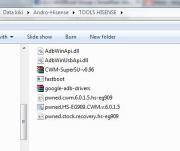
#optional...kalo driver fastboot blom terinstall
2. Driver Fastbot (google-adb-driver.rar) || http://www.mediafire.com/?see40c9xaq2jg5e
#############################################
# STEP 1 (install CWM 6.0.1.5 melalui PC)
#############################################
# STEP 1 (install CWM 6.0.1.5 melalui PC)
#############################################
1. Masuk Ke FASTBOOT (Matikan max-i, tahan tombol Volume Up + tekan Tombol Power)
(WELCOME TO FASTBOOT) =>> tekan tombol VOLUME UP sekali Lagi sampai ada tulisan Fastboot kecil
2. Setelah max-i masuk menu fastboot ,connectkan usb max-i ke PC
3. Double click file pwned.HS-EG909.CWM.v.6.0.1.5.bat (di PC)
4. ikuti perintah yg muncul, tunggu sampai proses selesai >>> sukses >> copot pasang batere. lanjut step dibawah.
# CARA MASUK KE CWM v.6.0.1.5 for HS-EG909
1. Masuk Ke CWM (Matikan max-i, tahan tombol Volume Down + tekan Tombol Power)
note: - tombol volume up/down u/ memilih menu
- tombol home u/ OK
- tombol back u/ Back
##################################
# BACKUP @just in case kalo boot-loop ...recomended
##################################
# BACKUP @just in case kalo boot-loop ...recomended
##################################
1. MASUK CWM
2. Masuk Menu backup and restore
3. Masuk Menu choose backup format
4. Pilih tar
5. pilih backup
########################
# RESTORE @just in case kalo boot-loop
########################
# RESTORE @just in case kalo boot-loop
########################
1. MASUK CWM
2. Masuk Menu backup and restore
3. Masuk Menu restore from internal sdcard
4. pilih yes-restore
#############################################
# STEP 2 install CWM-SuperSU-v0.96.zip
#############################################
# STEP 2 install CWM-SuperSU-v0.96.zip
#############################################
0. Copy File CWM-SuperSU-v0.96.zip Ke internal storage (yang 1 GB)
1. Max-i masih dalam keadaan mati, masuk CWM
2. Masuk Menu install zip from sdcard
3. Masuk Menu choose zip from internal sdcard
4. pilih file CWM-SuperSU-v0.96.zip
5. pilih reboot
#############################################
#############################################
# EASY UNROOT
#############################################
##UNROOT
1. Buka App. SUPER SU
2. pilih tab setting
3. pilih unroot
4. Reboot
##unroot manual
1. buka root explorer.. (klo blum install dulu..cari di market nyak
)2. masuk system/bin =>> Hapus file "su"
3. masuk system/app =>> Hapus file "superuser.apk"
4. reboot
#############################################
sumber dimari
Diubah oleh apopbubar 09-12-2012 18:43
0