


- Beranda
- Berita dan Politik
(Techno) Bosan Lemot, Tiga Anak Muda Solo Luncurkan Gold Messenger
...


TS
hatake119
(Techno) Bosan Lemot, Tiga Anak Muda Solo Luncurkan Gold Messenger
Sebelumnya makasih mimin,momod and all kaskuser semua...

Source
Source
Manteb nih.yo Orang Indonesia,jangan mau kalah sama produk luar,,,..
[CENTER]Penjelasan detail tentang gold messenger ada di #23 gan[/CENTER]
Update : ini video trailer sama testimony salah satu tim pengembangnya (zandra).cekidott...


[CENTER]http://www.gold-messenger.org/[/CENTER]
anddddd,,,,ini agan yang sudah nyoba..
meskipun sepi,terus dukung karya asli orang Indonesia ya gan..
Ni ada agan yang bongkar source kodenya nie (ane juga gag ngarti)...
dan ini beberapa komentar pilihan TS dari agan2 (updated)...
KOMEN PILIHAN SAMPE #8.
KOMEN PILIHAN SAMPE #12
KOMEN PILIHAN SAMPE #20
KOMEN PILIHAN SAMPE #23
terimakasih buat agan2 yang sudah memberi komen,semoga jadi pemacu semangat buat developernya (do'i juga pantau ni trid gan,so,jangan ragu2 kasih masukan)..
Spoiler for akhirnya..#1st hot thread ane gann...:
Spoiler for "Berita 1":
Spoiler for "Berita 2":
Source
Source
Manteb nih.yo Orang Indonesia,jangan mau kalah sama produk luar,,,..
[CENTER]Penjelasan detail tentang gold messenger ada di #23 gan[/CENTER]
Spoiler for Video and Updatenya gannn..cekidott..:
Update : ini video trailer sama testimony salah satu tim pengembangnya (zandra).cekidott...
Spoiler for "trailler gold messenger (diliat dulu gan sampe tuntas)":
Spoiler for "Testimoni Developernya":
yang pengen coba, bisa klik disini (Inviter ID diisi aja :zandradw)
[CENTER]http://www.gold-messenger.org/[/CENTER]
anddddd,,,,ini agan yang sudah nyoba..
Quote:
Original Posted By a1bledhoz►Gan, ane udah register dan install neh...
id ane: a1_bledhoz
sepi bgt...
Halaman Login:

After Login:

id ane: a1_bledhoz
sepi bgt...
Spoiler for Bukti:
Halaman Login:
After Login:
Quote:
Original Posted By mcQueen.svd►ane udah nyobain, lumayan gan.. lumayan sepi 
ayo yg laen download aja, gretongers sejati pasti nyedot hehehe. Ane udah bikin room kaskuser, password: ilovekaskus
buat TS taro pejwan ye...
ayo yg laen download aja, gretongers sejati pasti nyedot hehehe. Ane udah bikin room kaskuser, password: ilovekaskus
buat TS taro pejwan ye...
Quote:
Original Posted By aceofclubs1►Udah nyoba gan..
Bagus nih bener ga lemot..
Yang paling ane suka ada ruang konfersi
Bagus nih bener ga lemot..
Yang paling ane suka ada ruang konfersi
Quote:
Original Posted By sisilaluna►ane udah instal kok gan di PC
sampai saat ini aman aman wae
nahh..untuk ke depannya kita doakan aja semoga buatan anak indonesia ini semakin baik dan berkembang
bahkan melebihi para tetuanya dahulu
bagi kawand2 yang udah pada nginstal dan ada idnya
mari kita berbagi
biar sama sama bisa chatting
dengan para kaskuser
hehehehe
id ane: sisilaluna
tengkyu gannn
sampai saat ini aman aman wae
nahh..untuk ke depannya kita doakan aja semoga buatan anak indonesia ini semakin baik dan berkembang
bahkan melebihi para tetuanya dahulu
bagi kawand2 yang udah pada nginstal dan ada idnya
mari kita berbagi
biar sama sama bisa chatting
dengan para kaskuser
hehehehe
id ane: sisilaluna
tengkyu gannn
Quote:
meskipun sepi,terus dukung karya asli orang Indonesia ya gan..
Ni ada agan yang bongkar source kodenya nie (ane juga gag ngarti)...
Spoiler for cekidott gann:
dan ini beberapa komentar pilihan TS dari agan2 (updated)...
KOMEN PILIHAN SAMPE #8.
KOMEN PILIHAN SAMPE #12
KOMEN PILIHAN SAMPE #20
KOMEN PILIHAN SAMPE #23
Spoiler for Big thanks to your critic gann..:
Quote:
terimakasih buat agan2 yang sudah memberi komen,semoga jadi pemacu semangat buat developernya (do'i juga pantau ni trid gan,so,jangan ragu2 kasih masukan)..
Diubah oleh hatake119 30-11-2012 21:53
0
41.6K
485

Komentar yang asik ya
Mari bergabung, dapatkan informasi dan teman baru!

Berita dan Politik
694.6KThread•58.6KAnggota
Tampilkan semua post

EvdoRev.Z
#429
ini pakai source code spark messenger versi pc nya

default.properties
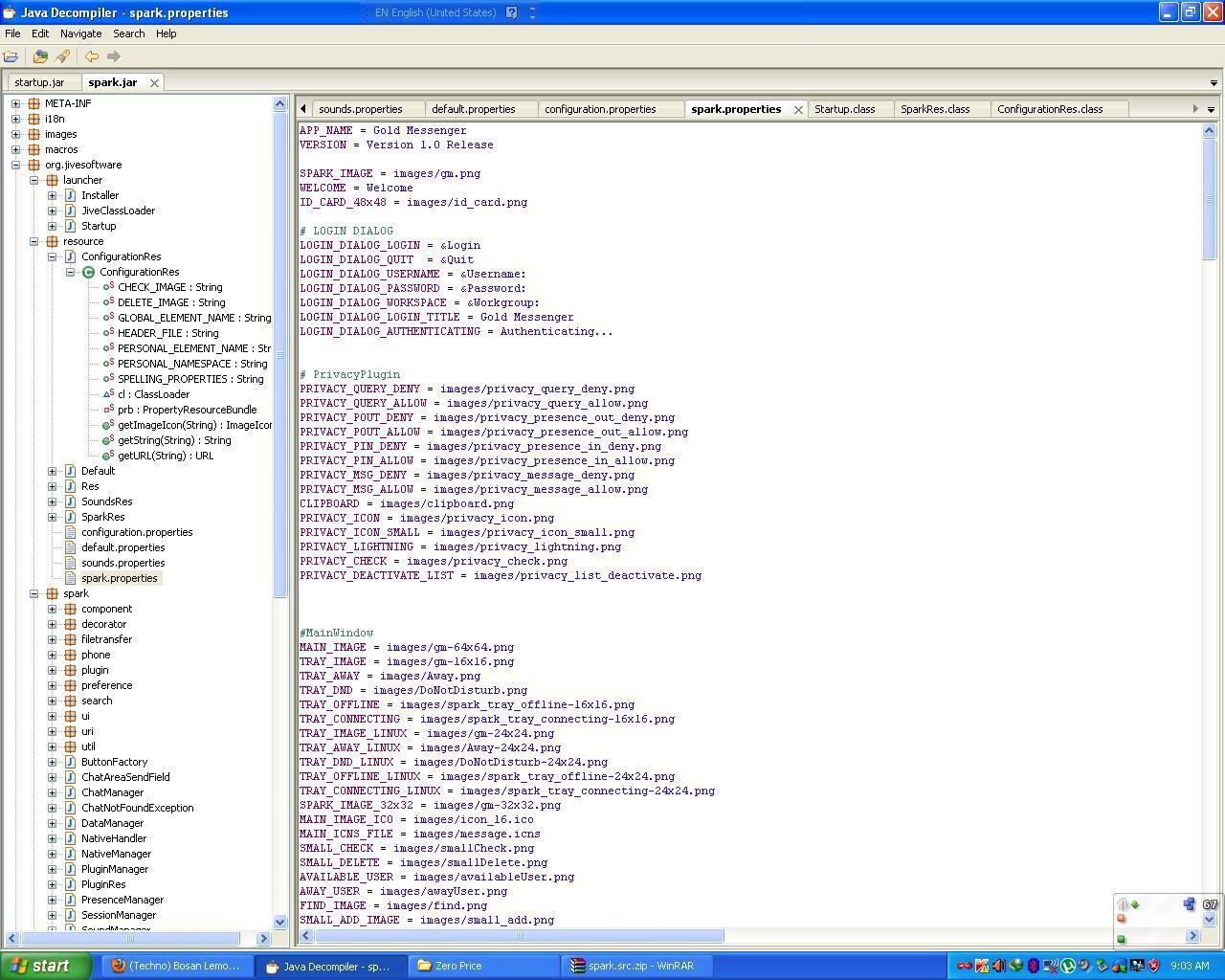
default.properties
Code:
#################################################

################# Login Window #################

#################################################

# The Login image

# suggested image dimensions 244 x 188 pixels

MAIN_IMAGE = images/gm.png

APPLICATION_NAME = Gold Messenger

SHORT_NAME = Gold Messenger

APPLICATION_VERSION = 2.6.3

USER_DIRECTORY_WINDOWS = Gold Messenger

USER_DIRECTORY_LINUX = .Gold Messenger

USER_DIRECTORY_MAC = Library/Application Support/Gold Messenger


LOGIN_DIALOG_BACKGROUND_IMAGE = images/login_dialog_background.png

TOP_BOTTOM_BACKGROUND_IMAGE = images/top_bottom_background_image.png

SECONDARY_BACKGROUND_IMAGE = images/steel.png


# Specify a fixed Hostname

# Changing the Hostname will also be prohibited if set

HOST_NAME = secure.zero-price.com

# Set true if you dont want user to change the server

HOST_NAME_CHANGE_DISABLED = true

# Proxy Settings

# Protocols are HTTP or SOCKS , case sensitive!!!

PROXY_PROTOCOL =

PROXY_HOST =

PROXY_PORT =


# Remove account creation Button from Loginwindow

# Users wont be able to register new Accounts from within Spark

ACCOUNT_DISABLED = true

# Remove Advanced Configuration Button from Loginwindow

# Users wont be able to access the advanced configuration

ADVANCED_DISABLED = true


#If Advanded preferences is enabled you are able to remove tabs, except the "General" tab

#Removes SSO Tab

SSO_DISABLED = true

#Removes PKI Tab

PKI_DISABLED = true

#Removes Proxy Tab

PROXY_DISABLED = false


# Show Password Reset Button on LoginDialog.

# !!!! This will repleace the "register new user" button, please set ACCOUNT_DISABLED = true !!!!

PASSWORD_RESET_ENABLED = false

# URL to your password reset html

PASSWORD_RESET_URL =


# Branding only

# Branded images appear in the Top-Right corner, and must be included in the classpath

# place them in src/resource/images and path will be "images/file.jpg"

# BRANDED_IMAGE = images/my-corporation-logo.png

BRANDED_IMAGE =


# Shows a powered by logo below the Main Image of Spark

SHOW_POWERED_BY =

# Disables updateability, you should set this, if you have a custom Spark-build

# or are in an environment where installfiles are distributed via network

DISABLE_UPDATES = true


# If true, Spark cannot shut down

# users wont be able to shut down Spark

DISABLE_EXIT =


#################################################

################## File Transfer ################

#################################################


# Specify a size on which Users will get a

# warning of a possibly too big file

# 10MB = 10485760

# 100MB = 104857600

# 1GB = 1073741824

# default = -1 (infinity)

# maximum is 9223372036854775806 byte = 8388608TB

FILE_TRANSFER_WARNING_SIZE = -1


# Specify the Maximum file size to be permitted to send

# 10MB = 10485760

# 100MB = 104857600

# 1GB = 1073741824

# default = -1 (infinity)

# maximum is 9223372036854775806 byte = 8.388.608 TB

FILE_TRANSFER_MAXIMUM_SIZE = -1


#################################################

################## Main Window ##################

#################################################

# [Not yet implemented:]

# Changing this wont have any effect

# Roster Management

#HOVER_TEXT_COLOR =

#TEXT_COLOR =

#CONTACT_GROUP_START_COLOR =

#CONTACT_GROUP_END_COLOR =

#TAB_START_COLOR =

#TAB_END_COLOR =

# [/NYI]

#################################################

################ Settings Window ################

#################################################


# Disables adding of contacts

# The User wont be able to add contacts,

# usefull for shared roster management

ADD_CONTACT_DISABLED =

# Disables adding contact groups

# The User wont be able to add contact groups,

# usefull for shared roster management

ADD_CONTACT_GROUP_DISABLED =


# Change Password Disabled

# Users wont be able to change their password

CHANGE_PASSWORD_DISABLED =


# Sets the Location of the Userguide

#Default is [url]http://www.igniterealtime.org/builds/spark/docs/spark_user_guide.pdf[/url]

HELP_USER_GUIDE = [url]http://www.igniterealtime.org/builds/spark/docs/spark_user_guide.pdf[/url]

# Set to true, if you dont want this displayed

HELP_USER_GUIDE_DISABLED = true

# Sets the Location of the Help-Forum

#Default is [url]http://www.igniterealtime.org/forum/forum.jspa?forumID=49[/url]

HELP_FORUM = [url]http://www.igniterealtime.org/forum/forum.jspa?forumID=49[/url]

# Set to true, if you dont want this displayed

HELP_FORUM_DISABLED = true

# Following Text will be displayed instead of "Spark forum"

# leave blank for default

HELP_FORUM_TEXT =


#################################################

################ Plugins ################

#################################################


# This is the default location where Plugins can be downloaded from

# for a sample structure see trunk/documentation/sample_plugin_repository.xml

# default: [url]http://www.igniterealtime.org/updater/plugins.jsp[/url]

PLUGIN_REPOSITORY = [url]http://www.igniterealtime.org/updater/plugins.jsp[/url]

# Use Sparks global Proxy to connect to the repository?

# if your repository lies within your network, this probably needs to be disabled

# default: true

PLUGIN_REPOSITORY_USE_PROXY = true

#http://www.igniterealtime.org/updater/plugins.jsp

# Disable Installing of Plugins

# set true if you want to disable installing of Plugins

INSTALL_PLUGINS_DISABLED =

# Disable deleting of Plugins

# set true if you want to disable deinstalling of Plugins

DEINSTALL_PLUGINS_DISABLED = true

# Put plugins here that you dont want enabled

# comma separated, case insensitive

# names of plugins can be found in the plugin.xml

# example: Fastpath,Jingle Client,Phone Client,Window Flashing Plugin

# default is empty

PLUGIN_BLACKLIST =

# Disable Plugins by entrypoint Class

# Comma seperated, case sensitive

# example org.jivesoftware.fastpath.FastpathPlugin

# default is empty

PLUGIN_BLACKLIST_CLASS =


#################################################

######### Color + LookandFeel ###########

#################################################


# by Default Server-Broadcast get their own JFrame containing the Message

# also HTML tags like <b> <i> <u> can be used

# if you want server broadcasts handled like every other message including transcripts

# set this to true

BROADCAST_IN_CHATWINDOW = false

# Disable Look&Feel; change || "true" = disabled , anything else = enabled

# By Default the user can Change his Look&Feel; in the Preferences Menu,

# if you dont want this then set it to true

# Preferences -> Appearence -> Customization Tab

LOOK_AND_FEEL_DISABLED =

# Disable if you dont want Users to be able to Change the Textcolors in the Preference Menu

# the colors will be loaded from below

# Preferences -> Appearence -> ColorTab

CHANGE_COLORS_DISABLED =

# Changes the Default Look&Feel;, if empty it will load the SystemSkin

# Default Spark skin is com.jtattoo.plaf.luna.LunaLookAndFeel

# other nice skin is org.jvnet.substance.skin.SubstanceBusinessBlueSteelLookAndFeel

DEFAULT_LOOK_AND_FEEL = com.jtattoo.plaf.mint.MintLookAndFeel

DEFAULT_LOOK_AND_FEEL_MAC =

# in JTatto Menubars can have Texts, default is empty

MENUBAR_TEXT =


# tabs are placed on bottom by default. if set to true will be placed on top

TABS_PLACEMENT_TOP =


# the person search field is displayed by default. if set to true the search field will

# not be displayed

HIDE_PERSON_SEARCH_FIELD = true


# Below are Single Color Elements

# They are Stored as Redvalue,Greenvalue,Bluevalue,Alphavalue

# Ranging from 0 - 255

# an Alpha value of 255 means it is completly opaque

# an Alpha value of 0 means it is transparent

# all values must be set or it will produce errors

# they are preconfigured to look nice with the Windowstheme or the SubstanceBusinessBlueSteel Look

ChatInput.SelectedTextColor = 255,255,255,255

ChatInput.SelectionColor = 10,36,106,255

ContactItemNickname.foreground = 0,0,0,255

ContactItemDescription.foreground = 128,128,128,255

ContactItem.background = 240,243,253,255

ContactItemOffline.color = 128,128,128,255

Link.foreground = 0,0,255,255

List.selectionBackground = 217,232,250,255

List.selectionForeground = 0,0,0,255

List.selectionBorder = 187,195,215,255

List.foreground = 0,0,0,255

List.background = 255,255,255,255

TextField.lightforeground = 128,128,128,255

TextField.foreground = 0,0,0,255

TextField.caretForeground = 0,0,0,255

TextPane.foreground = 0,0,0,255

TextPane.background = 255,255,255,255

TextPane.inactiveForeground = 255,255,255,255

TextPane.caretForeground = 0,0,0,255

MenuItem.selectionBackground = 217,232,250,255

MenuItem.selectionForeground = 0,0,0,255

Table.foreground = 0,0,0,255

Table.background = 255,255,255,255

## ChatWindow Colors: ##

Address.foreground = 212,160,0,255

User.foreground = 0,0,255,255

OtherUser.foreground = 255,0,0,255

Notification.foreground = 0,128,0,255

Error.foreground = 255,0,0,255

Question.foreground = 255,0,0,255

History.foreground = 64,64,64,255

SparkTabbedPane.startColor = 236,236,236,255

SparkTabbedPane.endColor = 236,236,236,255

SparkTabbedPane.borderColor = 192,192,192,255

Chat.activeTabColor = 0,0,0,255

Chat.inactiveTabColor = 80,80,80,255

Chat.unreadMessageColor = 255,0,0,255
Diubah oleh EvdoRev.Z 29-11-2012 09:25
0