
TS
andreya
DOTA 2 - it's not MOBA it's DOTA

Quote:
Developer: Valve Corporation
Publisher : Valve Corporation
Distributor : Steam (online)
Director : Erik Johnson
Designer : IceFrog
Composer(s) : Jason Hayes ,Tim Larkin
Engine : Source
Platform(s) :
,
, 
Release date : TBA
Status : BETA
Publisher : Valve Corporation
Distributor : Steam (online)
Director : Erik Johnson
Designer : IceFrog
Composer(s) : Jason Hayes ,Tim Larkin
Engine : Source
Platform(s) :
Release date : TBA
Status : BETA
DOTA 2 - it's not MOBA it's DOTA
Quote:
Dota began as a user-made modification for Warcraft 3 and has grown into one of the most played online games in the world. Following in the tradition of Counter-Strike, Day of Defeat, Team Fortress, Portal, and Alien Swarm, Dota 2 is the result of Valve hiring the community developers who built the mod and giving them the chance to finally build a full product out of their idea with the help of a professional team of developers and artists at Valve.
As for the gameplay, its a little hard to describe. The camera is set in the traditional RTS perspective, but it wouldnt be fair to call Dota an RTS. And while each hero starts at level 1, and many times hits the level cap of 25, it wouldnt be fair to call it an RPG.
Lots of people have tried to assign various genre names to Dota, but we think Action RTS is probably the most descriptive. And while we dont spend a lot of time trying to figure out what genre the game is inventing, we cant stop playing it internally!
As for the gameplay, its a little hard to describe. The camera is set in the traditional RTS perspective, but it wouldnt be fair to call Dota an RTS. And while each hero starts at level 1, and many times hits the level cap of 25, it wouldnt be fair to call it an RPG.
Lots of people have tried to assign various genre names to Dota, but we think Action RTS is probably the most descriptive. And while we dont spend a lot of time trying to figure out what genre the game is inventing, we cant stop playing it internally!

Quote:
System Requirements
Minimum
Windows XP
Intel Pentium 4 3 GHz
1 GB RAM
4 GB free HDD space
NVIDIA GeForce 6600 128 MB or ATi Radeon X800 128 MB
DirectX compatible sound card
Internet access for Steam activation
Keyboard and Mouse
Recommended
Windows 7
Intel Pentium Core 2 Duo 2.4 GHz
2 GB RAM
4 GB free HDD space
NVIDIA GeForce 7600 256 MB or ATi Radeon X1600 256 MB
DirectX compatible sound card
Internet access for Steam activation
Keyboard and Mouse
*game ini masih beta, masih dalam tahap pengembangan, sementara cuma bisa di windows dan belum di optimalin buat laptop
GET THE GAME ON STEAM NOW!
Spoiler for MAEN KESINI SUKA ADA YANG BAGI BAGI KEY:
Spoiler for how to get the game:
pertama
download steam disini
http://cdn.steampowered.com/download...eamInstall.msi
terus install
setelah install
buka program steamnya
terus bikin id steam
terus login steamnya
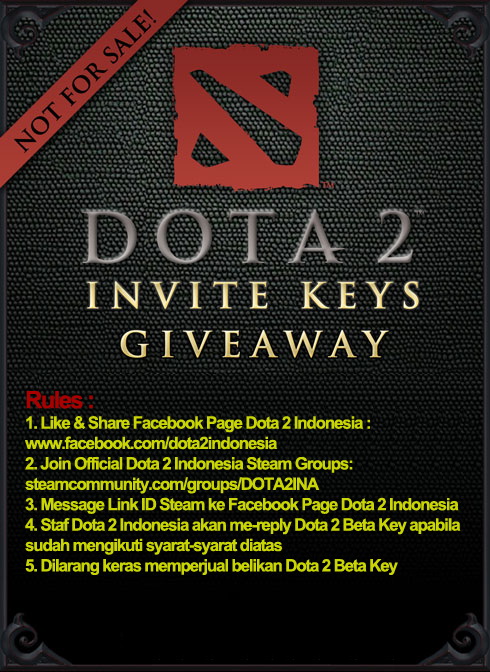
terus lakuin hal ini buat dapet key
Spoiler for picture:
Spoiler for SINGKAT:
JADI CARA SINGKATNYA GINI
#LO INSTALL STEAM http://cdn.steampowered.com/download...eamInstall.msi
#LO DAFTAR ID STEAM
# LO LAKUIN HAL INI LINK
#LO DIINVITE DOTA2
#LO INSTALL/DOWNLOAD DOTA 2
#LO MAEN DOTA2

masih belum dapet dota2 juga?
yaudah posting disini minta tolong invite ama warga sini
Goodluck
Quote:
BUAT YANG MAU NGEMIS BETAKEY
KONTAK DISINI
http://steamcommunity.com/id/dota2bot
BUAT YANG MAU NYUMBANG BETAKEY JUGA BISA
KONTAK DISINI
http://steamcommunity.com/id/dota2bot
BUAT YANG MAU NYUMBANG BETAKEY JUGA BISA
OFFICIAL GROUP DOTA 2 INDONESIA
Quote:
Quote:
Diubah oleh andreya 30-03-2013 08:21
0
645.9K
Kutip
12.1K
Balasan
Thread Digembok
Mari bergabung, dapatkan informasi dan teman baru!
PC Games
11.3KThread•9.7KAnggota
Tampilkan semua post
TS
andreya
#12
Quote:
Original Posted By macro_brain►-Steam update stuck
http://technet.microsoft.com/en-us/s.../bb897437.aspx
1.Download TCPViewer.
2.Extract dan double click TCPView.exe.
3.Buka steam, cari proses steam.exe di TCPView.
4.Klik kanan Steam.exe lalu click close connection.
5.???
6.PROFIT!
-Unable to Patch/Update stuck at 98%
an error occured while installing Dota 2 (connection timeout)
![kaskus-image]()
-Error while installing
![kaskus-image]()
-Steam crashed on startup
-Ingame spike
-Dota 2 Tweaking for Low end PC
-Gambar gelap? Brightness ga bisa diubah?
-Stuck di "Connecting to the Dota 2 Network"!
-Error Steam.exe (main exception): to run Steam, you must first connect to the internet.![kaskus-image]()
-Steam won't run: says Windows compatibility mode but isn't.
![kaskus-image]()
Dota 2 Smaller net_graph
[url]http://S E N S O R/4MG9SNii[/url]
DOTA 2 Crashing? Come Here Dota 2 Crash Fix and Fixes to Errors, Freezing, Lagging
Biasakan verify game cache integrity setelah selesai update/patching.
Spoiler for Solusi:
http://technet.microsoft.com/en-us/s.../bb897437.aspx
1.Download TCPViewer.
2.Extract dan double click TCPView.exe.
3.Buka steam, cari proses steam.exe di TCPView.
4.Klik kanan Steam.exe lalu click close connection.
5.???
6.PROFIT!
-Unable to Patch/Update stuck at 98%
an error occured while installing Dota 2 (connection timeout)

Spoiler for Solusi:
Steam\settings\download & cloud tab
ganti download region
ganti approximate speed
or
exit steam client
go to C:\Program Files\Steam
rename ClientRegistry.blob menjadi ClientRegistryOld.blob
ganti download region
ganti approximate speed
or
exit steam client
go to C:\Program Files\Steam
rename ClientRegistry.blob menjadi ClientRegistryOld.blob
-Error while installing

Spoiler for Solusi:
a. C:\Program Files (x86)\Steam\userdata\<ID>\config\localconfig.vdf
Shutdown steam. Back up that file and delete it, restart steam.
b. run steam.exe as administrador for windows 7 user
c. restart steam
Shutdown steam. Back up that file and delete it, restart steam.
b. run steam.exe as administrador for windows 7 user
c. restart steam
-Steam crashed on startup
Spoiler for Solusi:
delete semua isi folder steam
kecuali steam.exe, steam.dll and steamapps
-Ingame spike
Spoiler for Solusi:
Option\video
water quality=off
shadows=low
matikan vsync
sesuaikan render quality
textures=mid
main di fullscreen (borderless windows nyedot cpu)
option\game
network quality=off
option\sound
unit speech=events
tambahkan command seperti gambar dibawah ini
PS: U cant play in fullscren if u have "-nod3d9ex" in set launch option
water quality=off
shadows=low
matikan vsync
sesuaikan render quality
textures=mid
main di fullscreen (borderless windows nyedot cpu)
option\game
network quality=off
option\sound
unit speech=events
tambahkan command seperti gambar dibawah ini
PS: U cant play in fullscren if u have "-nod3d9ex" in set launch option
-Dota 2 Tweaking for Low end PC
Spoiler for Solusi:
http://www.media*fire..com/?c1t4d44pbab54qk
paste ke C:/Program Files (x86)/Steam/Steammaps/Common/DotA2/DotA/cfg
-Gambar gelap? Brightness ga bisa diubah?
Spoiler for Solusi:
a. main fullscreen
b. masukin command "mat_monitorgamma 2.2" di console (1.6 - 2.6 atau 1.2)
-Stuck di "Connecting to the Dota 2 Network"!
Spoiler for Solusi:
Relog steam atau CLOSE STEAM
FIND YOUR STEAM FOLDER
DELETE " ClientRegistry.blob "
FIND YOUR STEAM FOLDER
DELETE " ClientRegistry.blob "
-Error Steam.exe (main exception): to run Steam, you must first connect to the internet.

Spoiler for Solusi:
delete everything except steamapps folder and steam.exe from the main folder, and then ran Steam again.
http://forums.steampowered.com/forum....php?t=2610293
-Steam won't run: says Windows compatibility mode but isn't.
Spoiler for Solusi:

regedit:
Code:
HKEY_CURRENT_USER\Software\Microsoft\Windows NT\CurrentVersion\AppCompatFlags\Compatibility Assistant\Persisted
and
HKEY_CURRENT_USER\Software\Microsoft\Windows NT\CurrentVersion\AppCompatFlags\Layers
Delete the entry for steam.

Dota 2 Smaller net_graph
[url]http://S E N S O R/4MG9SNii[/url]
DOTA 2 Crashing? Come Here Dota 2 Crash Fix and Fixes to Errors, Freezing, Lagging
Biasakan verify game cache integrity setelah selesai update/patching.
kalo post ini masih gak bisa ngebantu kamu
silahkan posting di thread ini
dan juga
jangan lupa posting disini
DEV.DOTA2.COM
game ini masih beta bro
game final release aja kadang masih banyak masalahnya
0
Kutip
Balas